add adguard for windows v8 section #785
There are no files selected for viewing
This file contains hidden or bidirectional Unicode text that may be interpreted or compiled differently than what appears below. To review, open the file in an editor that reveals hidden Unicode characters.
Learn more about bidirectional Unicode characters
| Original file line number | Diff line number | Diff line change |
|---|---|---|
| @@ -1,5 +1,5 @@ | ||
| { | ||
| "position": 8, | ||
| "label": "AdGuard Browser Extension", | ||
| "collapsible": true, | ||
| "collapsed": true | ||
|
|
||
This file contains hidden or bidirectional Unicode text that may be interpreted or compiled differently than what appears below. To review, open the file in an editor that reveals hidden Unicode characters.
Learn more about bidirectional Unicode characters
| Original file line number | Diff line number | Diff line change |
|---|---|---|
| @@ -1,5 +1,5 @@ | ||
| { | ||
| "position": 10, | ||
| "label": "AdGuard Content Blocker", | ||
| "collapsible": true, | ||
| "collapsed": true | ||
|
|
||
This file contains hidden or bidirectional Unicode text that may be interpreted or compiled differently than what appears below. To review, open the file in an editor that reveals hidden Unicode characters.
Learn more about bidirectional Unicode characters
| Original file line number | Diff line number | Diff line change |
|---|---|---|
| @@ -1,5 +1,5 @@ | ||
| { | ||
| "position": 6, | ||
| "label": "AdGuard for Android", | ||
| "collapsible": true, | ||
| "collapsed": true | ||
|
|
||
This file contains hidden or bidirectional Unicode text that may be interpreted or compiled differently than what appears below. To review, open the file in an editor that reveals hidden Unicode characters.
Learn more about bidirectional Unicode characters
| Original file line number | Diff line number | Diff line change |
|---|---|---|
| @@ -1,5 +1,5 @@ | ||
| { | ||
| "position": 7, | ||
| "label": "AdGuard for iOS", | ||
| "collapsible": true, | ||
| "collapsed": true | ||
|
|
||
This file contains hidden or bidirectional Unicode text that may be interpreted or compiled differently than what appears below. To review, open the file in an editor that reveals hidden Unicode characters.
Learn more about bidirectional Unicode characters
| Original file line number | Diff line number | Diff line change |
|---|---|---|
| @@ -1,5 +1,5 @@ | ||
| { | ||
| "position": 11, | ||
| "label": "AdGuard for Linux", | ||
| "collapsible": true, | ||
| "collapsed": true | ||
|
|
||
This file contains hidden or bidirectional Unicode text that may be interpreted or compiled differently than what appears below. To review, open the file in an editor that reveals hidden Unicode characters.
Learn more about bidirectional Unicode characters
| Original file line number | Diff line number | Diff line change |
|---|---|---|
| @@ -1,5 +1,5 @@ | ||
| { | ||
| "position": 5, | ||
| "label": "AdGuard for Mac", | ||
| "collapsible": true, | ||
| "collapsed": true | ||
|
|
||
This file contains hidden or bidirectional Unicode text that may be interpreted or compiled differently than what appears below. To review, open the file in an editor that reveals hidden Unicode characters.
Learn more about bidirectional Unicode characters
| Original file line number | Diff line number | Diff line change |
|---|---|---|
| @@ -1,5 +1,5 @@ | ||
| { | ||
| "position": 9, | ||
| "label": "AdGuard for Safari", | ||
| "collapsible": true, | ||
| "collapsed": true | ||
|
|
||
This file contains hidden or bidirectional Unicode text that may be interpreted or compiled differently than what appears below. To review, open the file in an editor that reveals hidden Unicode characters.
Learn more about bidirectional Unicode characters
| Original file line number | Diff line number | Diff line change |
|---|---|---|
| @@ -0,0 +1,6 @@ | ||
| { | ||
| "position": 4, | ||
| "label": "AdGuard for Windows v8", | ||
| "collapsible": true, | ||
| "collapsed": true | ||
| } |
This file contains hidden or bidirectional Unicode text that may be interpreted or compiled differently than what appears below. To review, open the file in an editor that reveals hidden Unicode characters.
Learn more about bidirectional Unicode characters
| Original file line number | Diff line number | Diff line change |
|---|---|---|
| @@ -0,0 +1,36 @@ | ||
| --- | ||
| title: AdGuard for Windows v8 | ||
| sidebar_position: 1 | ||
| --- | ||
|
|
||
| :::info | ||
|
|
||
| This article describes AdGuard for Windows v8.0, a comprehensive ad blocker that protects your device at the system level. This is a beta release that is still under development. To try it, download the [beta version of AdGuard for Windows](https://agrd.io/windows_beta). | ||
|
|
||
| ::: | ||
|
|
||
| AdGuard for Windows is an easy-to-use tool that blocks annoying banners, popups, video ads, and trackers. But that’s not all: it helps you save traffic, load web pages faster, and protect your computer from undesirable and potentially malicious websites. AdGuard also protects you from phishing websites and keeps your kids away from inappropriate content. | ||
|
|
||
|  | ||
|
|
||
| On the Home screen, you’ll find a toggle to enable or disable AdGuard protection, as well as icons for *Ad blocking*, *Tracking protection*, *DNS protection*, and *Annoyance blocking*. Main settings can be accessed through the left-side menu. | ||
|
|
||
| ## [Protection](/adguard-for-windows-8/protection/) | ||
|
|
||
| Settings to configure *Ad blocking*, *Tracking protection*, *DNS protection*, *Annoyances blocking*, *Browsing security*, *Parental control*, and *Extensions*. | ||
|
|
||
| ## [Statistics](/adguard-for-windows-8/statistics/) | ||
|
|
||
| Detailed information about blocked ads, trackers, and data usage. | ||
|
|
||
| ## [App management](/adguard-for-windows-8/app-management/) | ||
|
|
||
| Settings to customize traffic filtering and routing for each app and browser. | ||
|
|
||
| ## [Settings](/adguard-for-windows-8/settings/) | ||
|
|
||
| Options to select language and theme, view legal documents, check license information, and contact support. Advanced settings and network settings also live there. | ||
|
|
||
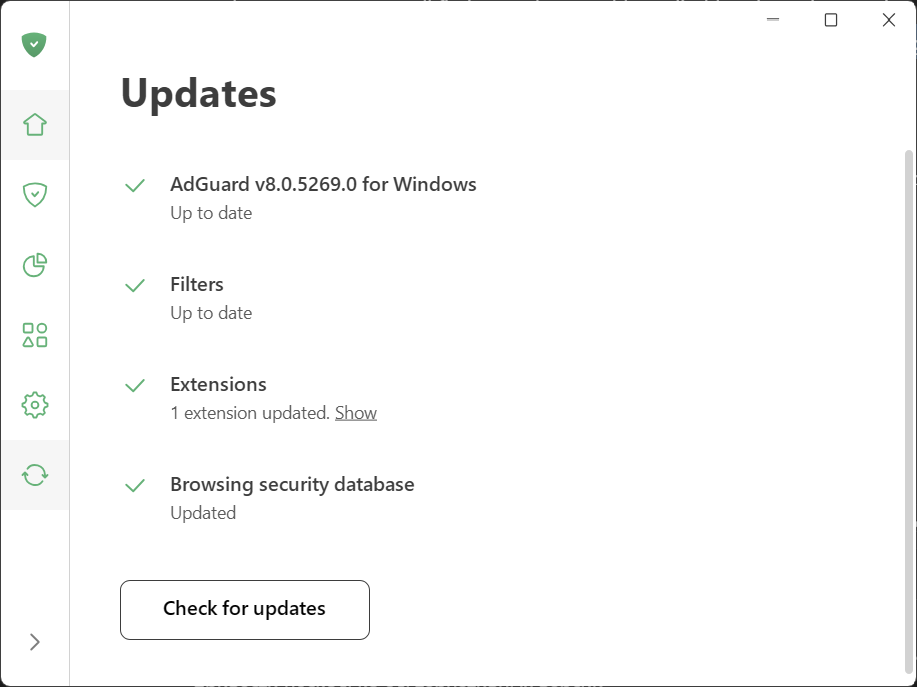
| Click *Check for updates* to see whether your app version, filters, and extensions are up to date. | ||
|
|
||
|  | ||
|
|
||

This file contains hidden or bidirectional Unicode text that may be interpreted or compiled differently than what appears below. To review, open the file in an editor that reveals hidden Unicode characters.
Learn more about bidirectional Unicode characters
| Original file line number | Diff line number | Diff line change |
|---|---|---|
| @@ -0,0 +1,6 @@ | ||
| { | ||
| "position": 4, | ||
| "label": "App management", | ||
| "collapsible": true, | ||
| "collapsed": true | ||
| } |
This file contains hidden or bidirectional Unicode text that may be interpreted or compiled differently than what appears below. To review, open the file in an editor that reveals hidden Unicode characters.
Learn more about bidirectional Unicode characters
| Original file line number | Diff line number | Diff line change |
|---|---|---|
| @@ -0,0 +1,34 @@ | ||
| --- | ||
| title: App management | ||
| sidebar_position: 1 | ||
| --- | ||
|
|
||
| :::info | ||
|
|
||
| This article describes AdGuard for Windows v8.0, a comprehensive ad blocker that protects your device at the system level. This is a beta release that is still under development. To try it, download the [beta version of AdGuard for Windows](https://agrd.io/windows_beta). | ||
|
|
||
| ::: | ||
|
|
||
| In the *App management* section, you can manage routing and filtering settings for all apps installed on your device. | ||
|
|
||
| Once AdGuard detects that an app has gone online, it is automatically added to *App management*, and its traffic is routed through AdGuard. | ||
|
|
||
| By default, AdGuard filters all traffic, but you can choose what to exclude. | ||
|
|
||
| AdGuard also filters HTTPS traffic, as most websites today use HTTPS. This is especially important for blocking ads on sites like youtube.com, facebook.com, and x.com, where it is impossible to remove ads without HTTPS filtering. | ||
|
|
||
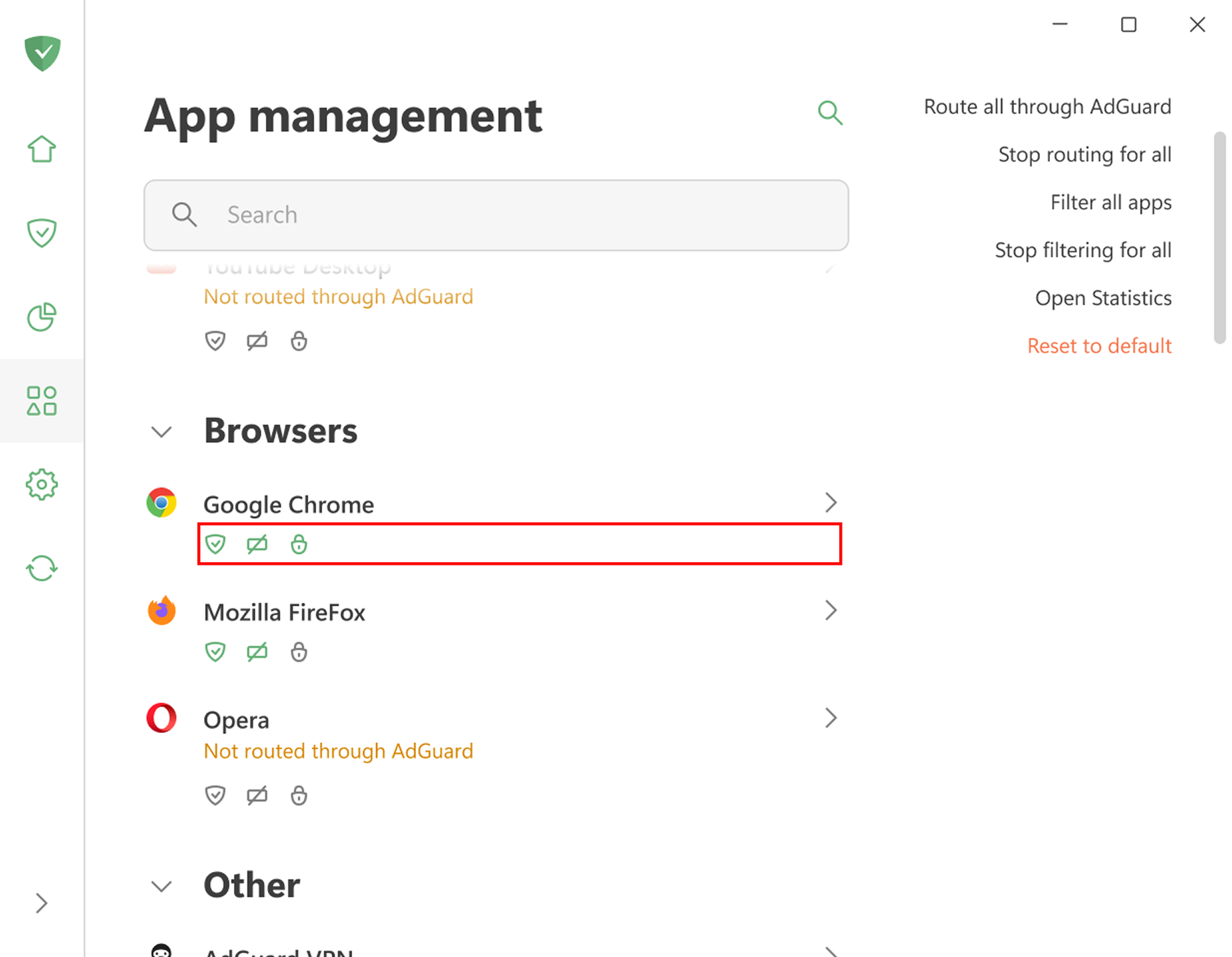
| When routing and filtering are enabled for an app, the icons below each app will appear green. | ||
|
|
||
|  | ||
|
|
||
|
|
||
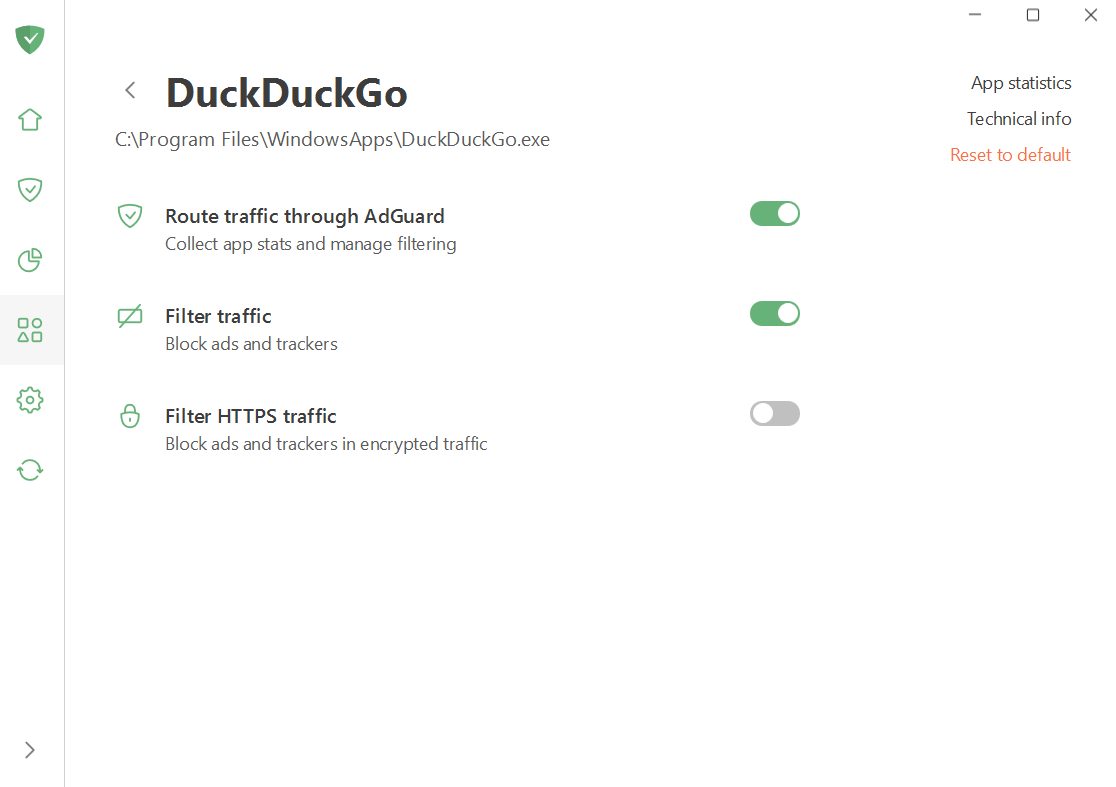
| You can leave the settings as they are, disable both filtering and routing, or fine-tune them manually for each app. You can also access the app’s stats. | ||
|
|
||
|  | ||
|
|
||
|
|
||
| ## “Problem-free” and “problematic” apps | ||
|
|
||
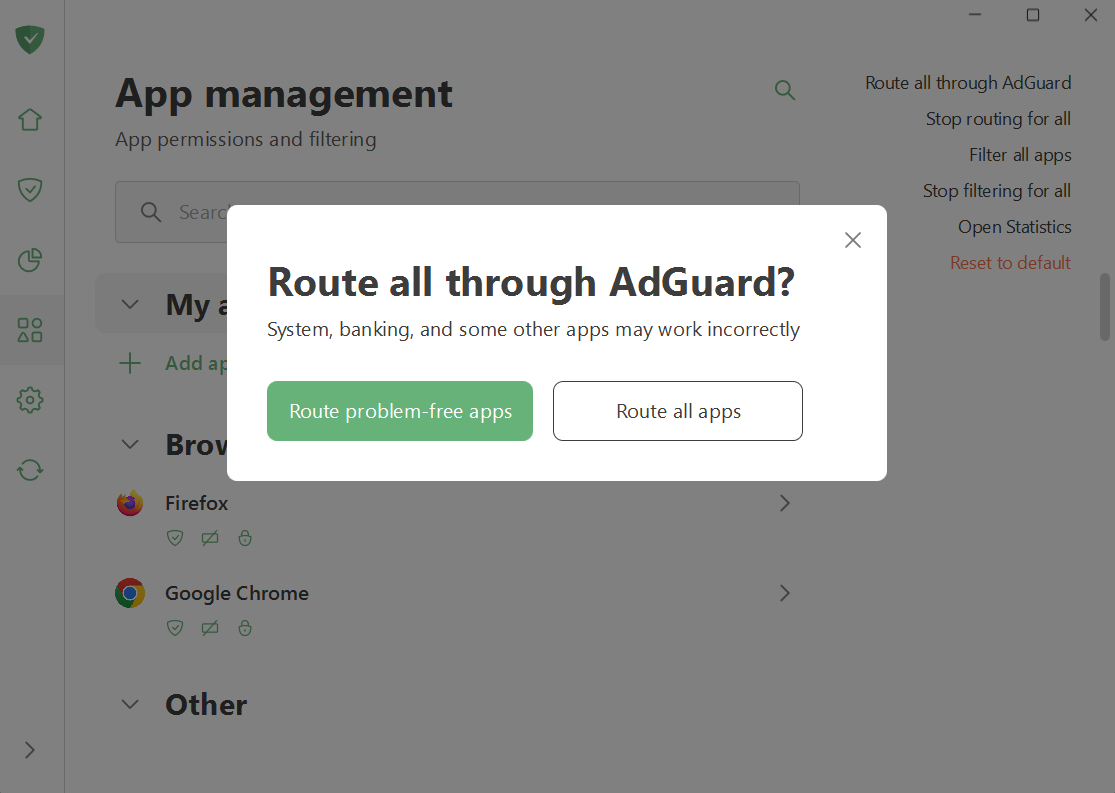
| Most apps work correctly when filtered. Some apps are considered “problematic” and may not work correctly when routed through AdGuard. You may see a warning like this when trying to route or filter all apps: | ||
|
|
||
|  | ||
|
|
||
|
|
||
| To ensure the proper operation of all apps installed on your device, we recommend routing only problem-free apps through AdGuard. | ||
This file contains hidden or bidirectional Unicode text that may be interpreted or compiled differently than what appears below. To review, open the file in an editor that reveals hidden Unicode characters.
Learn more about bidirectional Unicode characters
| Original file line number | Diff line number | Diff line change |
|---|---|---|
| @@ -0,0 +1,6 @@ | ||
| { | ||
| "position": 2, | ||
| "label": "Protection", | ||
| "collapsible": true, | ||
| "collapsed": true | ||
| } |
This file contains hidden or bidirectional Unicode text that may be interpreted or compiled differently than what appears below. To review, open the file in an editor that reveals hidden Unicode characters.
Learn more about bidirectional Unicode characters
| Original file line number | Diff line number | Diff line change |
|---|---|---|
| @@ -0,0 +1,26 @@ | ||
| --- | ||
| title: Ad blocking | ||
| sidebar_position: 1 | ||
| --- | ||
|
|
||
| :::info | ||
|
|
||
| This article describes AdGuard for Windows v8.0, a comprehensive ad blocker that protects your device at the system level. This is a beta release that is still under development. To try it, download the [beta version of AdGuard for Windows](https://agrd.io/windows_beta). | ||
|
|
||
| ::: | ||
|
|
||
| The *Ad blocking* section is responsible for removing ads from the websites you visit and from the apps installed on your device. To filter banners, popups, trackers, and other intrusive elements, AdGuard relies on filters — sets of rules written in a [special syntax](/general/ad-filtering/create-own-filters). If you’d like to learn more about how they work, read our [article about filters](/general/ad-filtering/how-ad-blocking-works). | ||
|
|
||
|  | ||
|
|
||
| Here you can: | ||
|
|
||
| - enable basic protection, | ||
| - block [search ads and self-promotion](/general/ad-filtering/search-ads), | ||
| - disable ads in the Start menu on Windows 11, | ||
| - enable automatic activation of language-specific filters | ||
| - manage user rules. | ||
|
|
||
| You can also open the *Filtering log* to view all requests made by browsers and apps on your computer. From there, it’s easy to block or unblock any request by creating a custom rule. In the *Filter editor*, you can create, add, and import your own rules and filters. | ||
|
|
||
| 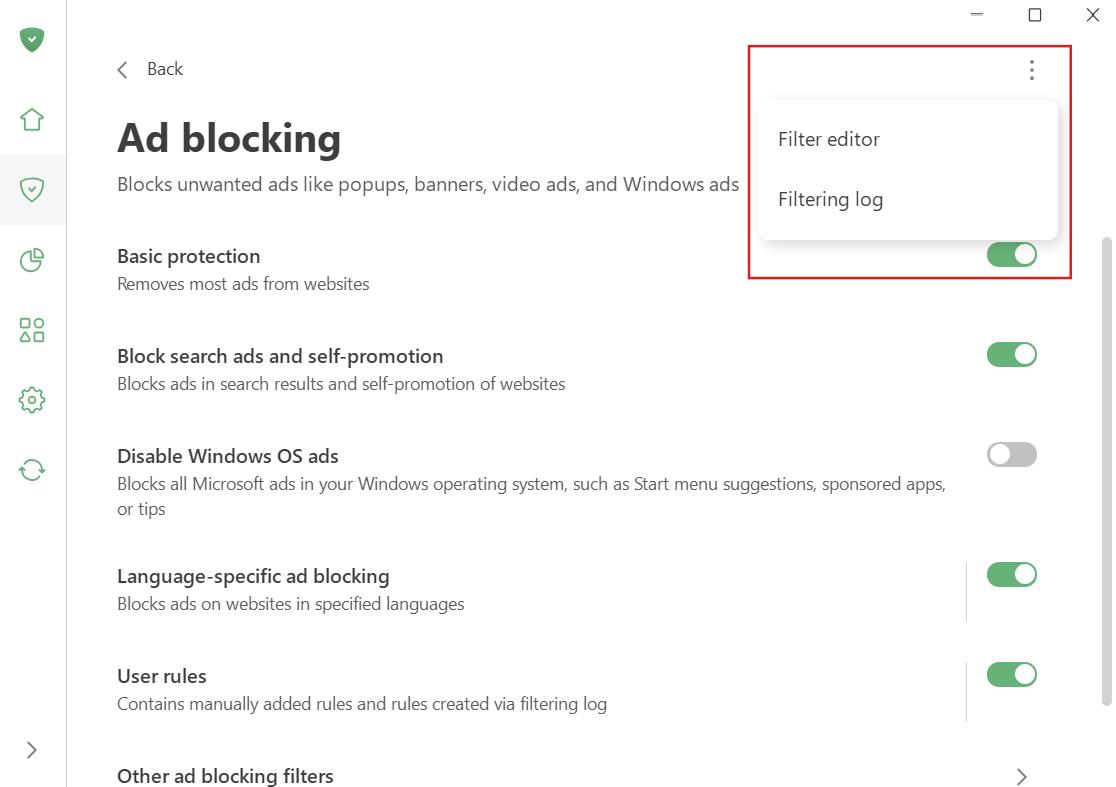 |
This file contains hidden or bidirectional Unicode text that may be interpreted or compiled differently than what appears below. To review, open the file in an editor that reveals hidden Unicode characters.
Learn more about bidirectional Unicode characters
| Original file line number | Diff line number | Diff line change |
|---|---|---|
| @@ -0,0 +1,26 @@ | ||
| --- | ||
| title: Annoyance blocking | ||
| sidebar_position: 3 | ||
| --- | ||
|
|
||
| :::info | ||
|
|
||
| This article describes AdGuard for Windows v8.0, a comprehensive ad blocker that protects your device at the system level. This is a beta release that is still under development. To try it, download the [beta version of AdGuard for Windows](https://agrd.io/windows_beta). | ||
|
|
||
| ::: | ||
|
|
||
| Annoyance filters are designed to improve website usability by blocking non-advertisement elements that distract from or interfere with site interaction or content consumption. These elements include modal windows, interactive forms, cookie consent notifications and requests, mobile app banners, and various widgets. | ||
|
|
||
| These filters may contain rules that are not suitable for all users. Sometimes it is recommended to disable them. The decisions to add rules to this filter are made by filter developers on a rule-by-rule basis. | ||
|
|
||
| 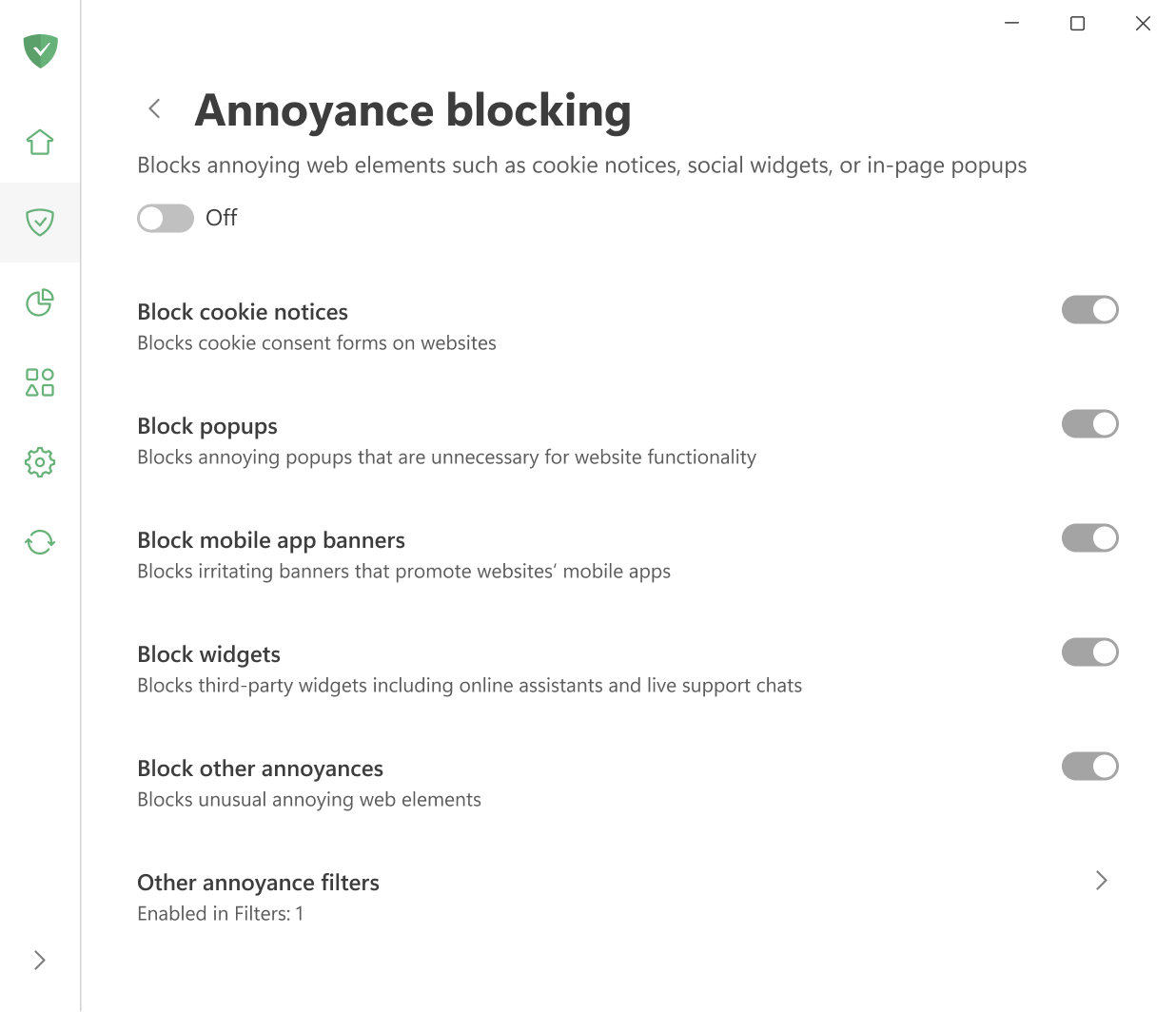 | ||
|
|
||
|
|
||
| **Block cookie notices** removes cookie consent banners on webpages. | ||
|
|
||
| **Block mobile app banners** removes banners that promote mobile apps on websites. | ||
|
|
||
| **Block other annoyances** removes elements that do not fall under the popular categories of annoyances. | ||
|
|
||
| **Block popups** removes all kinds of popups that are not necessary for websites’ operation. | ||
|
|
||
| **Block widgets** removes online assistants, live support chats, and similar tools. | ||
This file contains hidden or bidirectional Unicode text that may be interpreted or compiled differently than what appears below. To review, open the file in an editor that reveals hidden Unicode characters.
Learn more about bidirectional Unicode characters
| Original file line number | Diff line number | Diff line change |
|---|---|---|
| @@ -0,0 +1,26 @@ | ||
| --- | ||
| title: Browsing security | ||
| sidebar_position: 5 | ||
| --- | ||
|
|
||
| :::info | ||
|
|
||
| This article describes AdGuard for Windows v8.0, a comprehensive ad blocker that protects your device at the system level. This is a beta release that is still under development. To try it, download the [beta version of AdGuard for Windows](https://agrd.io/windows_beta). | ||
|
|
||
| ::: | ||
|
|
||
| *Browsing security* offers strong protection against harmful websites and phishing attempts. | ||
|
|
||
| While AdGuard for Windows is not an antivirus, it does provide essential security by warning you before visiting untrusted sites or downloading potentially dangerous files. | ||
|
|
||
| It won’t stop a virus that is already being downloaded, and it won’t remove existing malware. But it will block access to websites that are marked as unsafe, helping you avoid threats in the first place. | ||
|
|
||
| For more details about how this protection works, see our article [Phishing and malware protection](/general/browsing-security). | ||
|
|
||
| 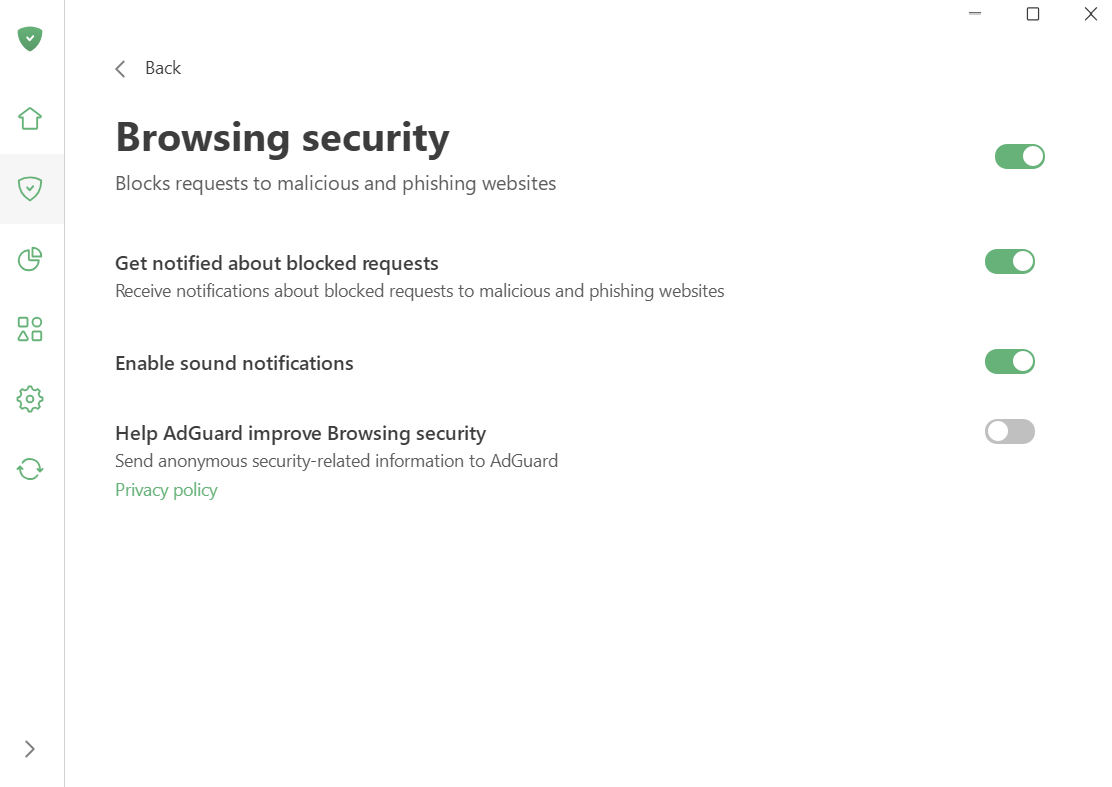 | ||
|
|
||
| In the *Browsing security* section, you can: | ||
|
|
||
| - turn on notifications about blocked malicious and phishing websites; | ||
| - enable sound alerts; | ||
| - allow anonymous security security-related data to be sent to AdGuard, which helps us keep our database of harmful websites up to date. |
This file contains hidden or bidirectional Unicode text that may be interpreted or compiled differently than what appears below. To review, open the file in an editor that reveals hidden Unicode characters.
Learn more about bidirectional Unicode characters
| Original file line number | Diff line number | Diff line change |
|---|---|---|
| @@ -0,0 +1,48 @@ | ||
| --- | ||
| title: DNS protection | ||
| sidebar_position: 4 | ||
| --- | ||
|
|
||
| :::info | ||
|
|
||
| This article describes AdGuard for Windows v8.0, a comprehensive ad blocker that protects your device at the system level. This is a beta release that is still under development. To try it, download the [beta version of AdGuard for Windows](https://agrd.io/windows_beta). | ||
|
|
||
| ::: | ||
|
|
||
| DNS protection gives you more control over how your device connects to the Internet. There are three main reasons why it can be useful: | ||
|
|
||
| ## 1. Protect your privacy from your ISP | ||
|
|
||
| Every time you open a website, for example `google.com`, your browser sends a request to a DNS server to get the IP address of the website in return. Usually, the DNS server belongs to your ISP, which means they can track the websites you visit. If you switch to another DNS server, such as AdGuard DNS, your ISP no longer sees your online activity. | ||
|
|
||
| ## 2. Encrypt your DNS traffic | ||
|
|
||
| Modern protocols like DNS-over-TLS and DNS-over-HTTPS ensure that your DNS requests are encrypted. This protects them from being intercepted, modified, or spied on by attackers. | ||
|
|
||
| ## 3. Block unwanted content at the DNS level | ||
|
|
||
| DNS protection can filter out ads, trackers, phishing websites, and other harmful or annoying content before it even loads in your browser or apps. [Learn more about DNS filtering](https://adguard-dns.io/kb/general/dns-filtering/) | ||
|
|
||
| 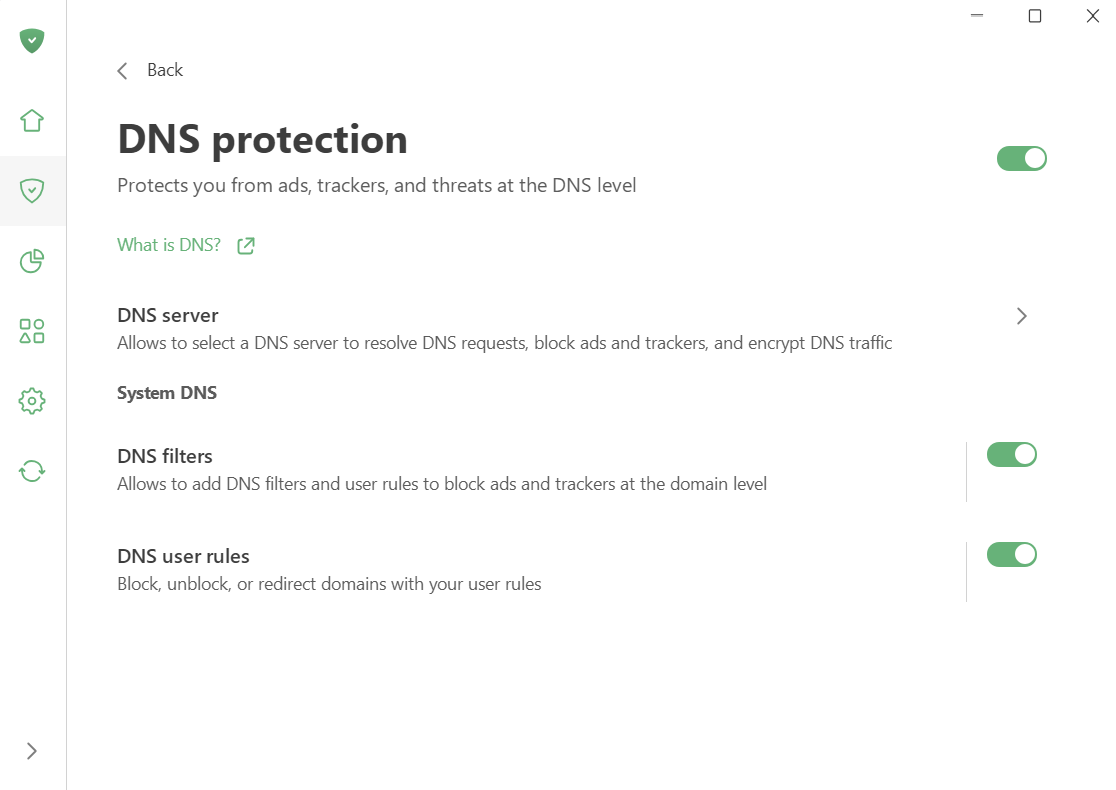 | ||
|
|
||
| Here’s what you can configure in DNS protection: | ||
|
|
||
| ## Choose a DNS server | ||
|
|
||
| You can select from multiple trusted DNS providers. AdGuard itself offers several options for different needs: | ||
|
|
||
| - AdGuard DNS — blocks ads and trackers. | ||
|
|
||
| - AdGuard DNS Family Protection — blocks ads, trackers, and adult content. | ||
|
|
||
| - AdGuard DNS Non-filtering — provides a secure and reliable connection without any filtering. | ||
|
|
||
| You can use one of our public servers, add your own custom DNS server, or pick another trusted option from our [list of trusted DNS providers](https://adguard-dns.io/kb/general/dns-providers/). | ||
|
|
||
| ## Add DNS filters and rules | ||
|
|
||
| To fine-tune protection, you can create your own DNS filters using [DNS rule syntax](https://adguard-dns.io/kb/general/dns-filtering-syntax/) or import ready-made [DNS filters](https://filterlists.com). | ||
|
|
||
| In addition, you can create custom DNS rules to block, unblock, or redirect domains as needed. Use our built-in rule constructor. | ||
|
|
||
| 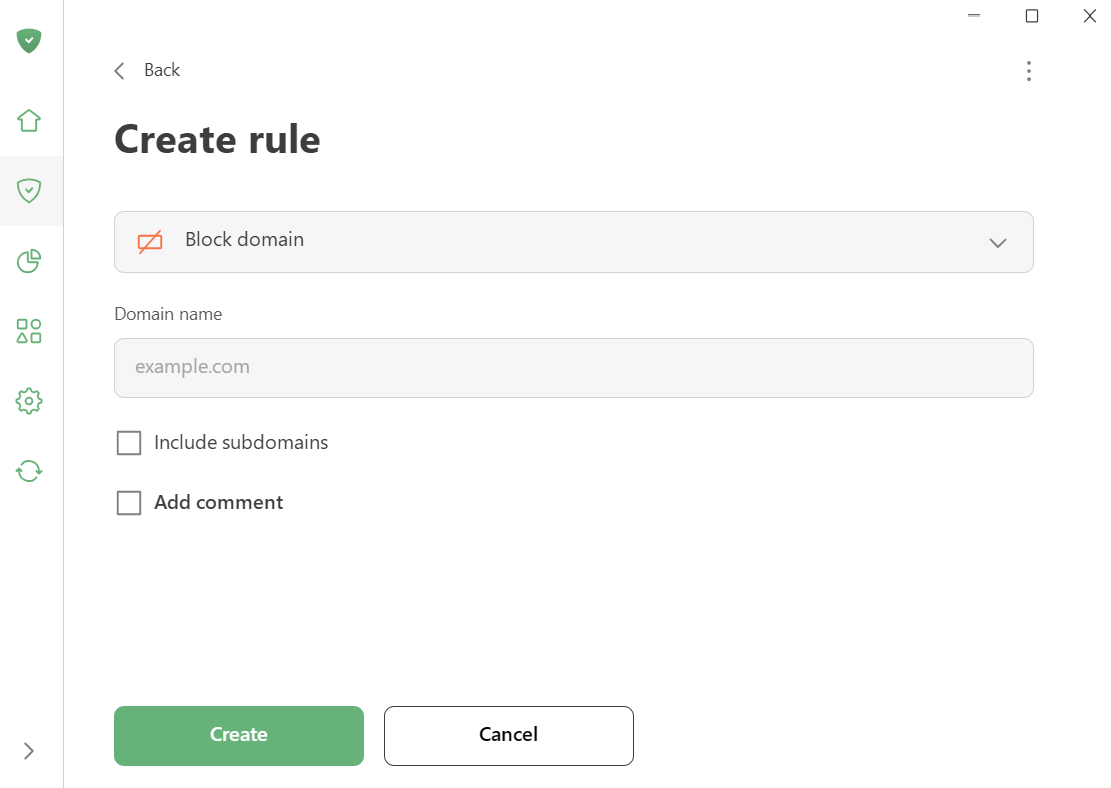 | ||
|
|
||
This file contains hidden or bidirectional Unicode text that may be interpreted or compiled differently than what appears below. To review, open the file in an editor that reveals hidden Unicode characters.
Learn more about bidirectional Unicode characters
| Original file line number | Diff line number | Diff line change |
|---|---|---|
| @@ -0,0 +1,51 @@ | ||
| --- | ||
| title: Extensions | ||
| sidebar_position: 7 | ||
| --- | ||
|
|
||
| :::info | ||
|
|
||
| This article describes AdGuard for Windows v8.0, a comprehensive ad blocker that protects your device at the system level. This is a beta release that is still under development. To try it, download the [beta version of AdGuard for Windows](https://agrd.io/windows_beta). | ||
|
|
||
| ::: | ||
|
|
||
| AdGuard can extend website functionality by acting as a [userscript manager](/general/extensions.md). This allows you to add your own scripts as well as manage existing ones. | ||
|
|
||
| 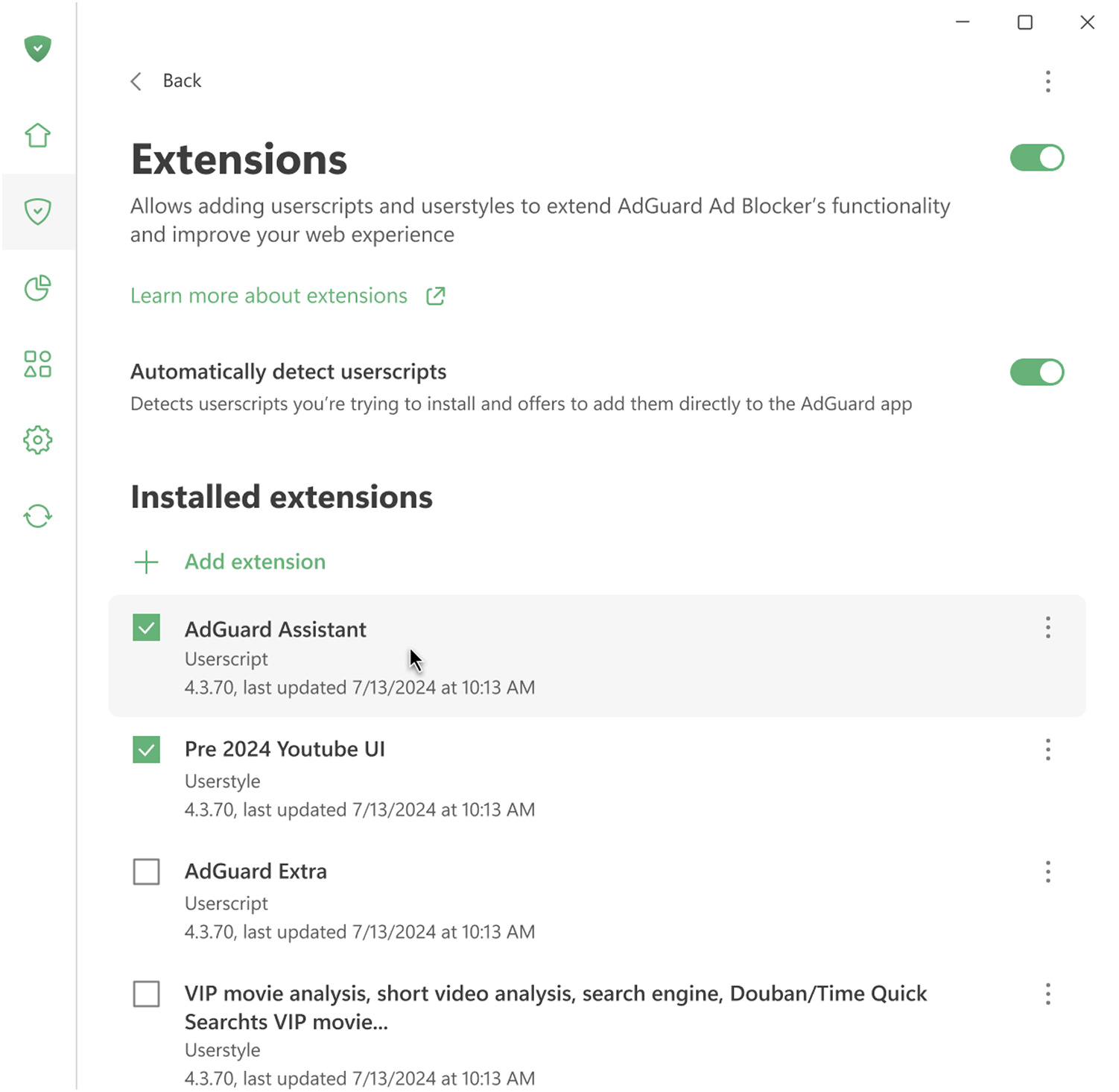 | ||
|
|
||
| ## Automatically detect userscripts | ||
|
|
||
| When this option is enabled, AdGuard automatically notices when your browser requests a userscript and offers to install it. If you prefer, you can also download and install userscripts manually. | ||
|
|
||
| ## Pre-installed userscripts | ||
|
|
||
| AdGuard comes with four pre-installed userscripts: | ||
|
|
||
| - AdGuard Assistent (Beta) | ||
| - AdGuard Extra | ||
| - AdGuard Popup blocker | ||
| - Web of Trust | ||
|
|
||
| ### AdGuard Assistant (Beta) | ||
|
|
||
| AdGuard Assistant is the legacy version of Assistant, which you can use if the [new Assistant](/adguard-for-windows/browser-assistant.md) is not available for your browser. As the name suggests, it helps you manage basic AdGuard settings directly from your browser without opening the app. | ||
|
|
||
| AdGuard Assistant works with all browsers compatible with Microsoft Windows. It will not appear on websites excluded from filtering or on certain pages where it could cause display issues. | ||
|
|
||
| ### AdGuard Extra | ||
|
|
||
| AdGuard Extra is a custom extension created to fight ad-blocker circumvention and ad reinjection methods used by websites. Such techniques are becoming more common as advertisers try to bypass ad blockers. | ||
|
|
||
| AdGuard Extra works by modifying the way pages are loaded, making it more difficult for websites to bypass ad blockers using these advanced methods. | ||
|
|
||
| ### AdGuard Popup Blocker (Beta) | ||
|
|
||
| This extension stops unwanted pop-up windows from opening while you browse. Some popups can be useful — for example, settings for website management or extra reference information that appears after clicking a link. If needed, you can turn off the Popup Blocker. | ||
|
|
||
| This extension does not work on the allowlisted websites. | ||
|
|
||
| ### Web of Trust (Beta) | ||
|
|
||
| Web of Trust lets you see the reputation of websites based on user ratings. Websites are reviewed according to several criteria, including trust and security. | ||
|
|
||
| This extension is off by default. Keep in mind that it is developed by a third party, not AdGuard. |
This file contains hidden or bidirectional Unicode text that may be interpreted or compiled differently than what appears below. To review, open the file in an editor that reveals hidden Unicode characters.
Learn more about bidirectional Unicode characters
| Original file line number | Diff line number | Diff line change |
|---|---|---|
| @@ -0,0 +1,24 @@ | ||
| --- | ||
| title: Parental control | ||
| sidebar_position: 6 | ||
| --- | ||
|
|
||
| :::info | ||
|
|
||
| This article describes AdGuard for Windows v8.0, a comprehensive ad blocker that protects your device at the system level. This is a beta release that is still under development. To try it, download the [beta version of AdGuard for Windows](https://agrd.io/windows_beta). | ||
|
|
||
| ::: | ||
|
|
||
| There are several websites that children shouldn’t be able to access. *Parental control* helps you solve this problem. | ||
|
|
||
| 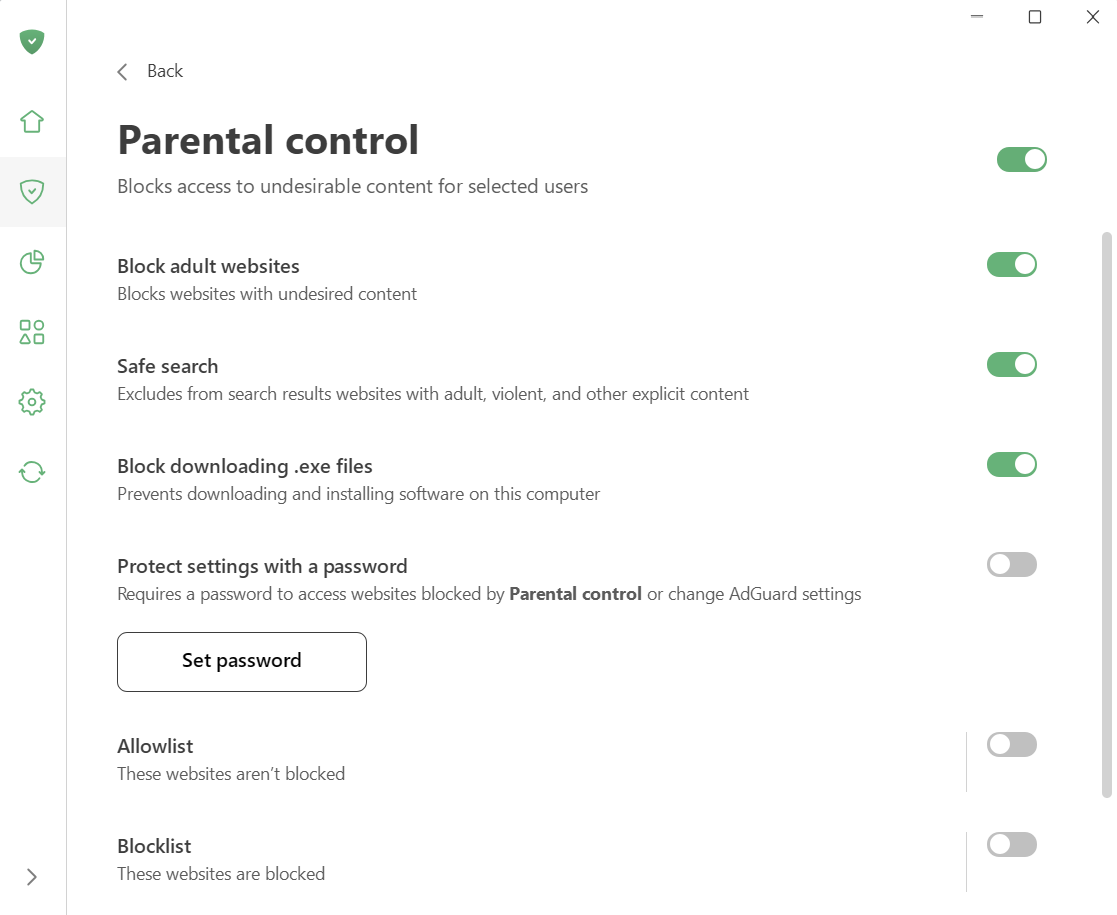 | ||
|
|
||
| When *Parental control* is enabled, AdGuard scans the content of webpages and blocks those that may be harmful or inappropriate for children. This includes adult images and text, crude language, violence, and drug-related content. | ||
|
|
||
| You can also turn on *Safe search* to remove inappropriate links from search results. | ||
|
|
||
| To prevent children from downloading unwanted programs, enable the *Block downloading exe.files* option. This option blocks them from downloading and installing software. | ||
|
|
||
| You can manage the *Blocklist* and the *Allowlist* to decide which websites should be blocked and which should be allowed. | ||
|
|
||
| Finally, you can protect these settings with a password and choose which user accounts they apply to. |
This file contains hidden or bidirectional Unicode text that may be interpreted or compiled differently than what appears below. To review, open the file in an editor that reveals hidden Unicode characters.
Learn more about bidirectional Unicode characters
| Original file line number | Diff line number | Diff line change |
|---|---|---|
| @@ -0,0 +1,28 @@ | ||
| --- | ||
| title: Protection | ||
| sidebar_position: 1 | ||
| --- | ||
|
|
||
| :::info | ||
|
|
||
| This article describes AdGuard for Windows v8.0, a comprehensive ad blocker that protects your device at the system level. This is a beta release that is still under development. To try it, download the [beta version of AdGuard for Windows](https://agrd.io/windows_beta). | ||
|
|
||
| ::: | ||
|
|
||
| 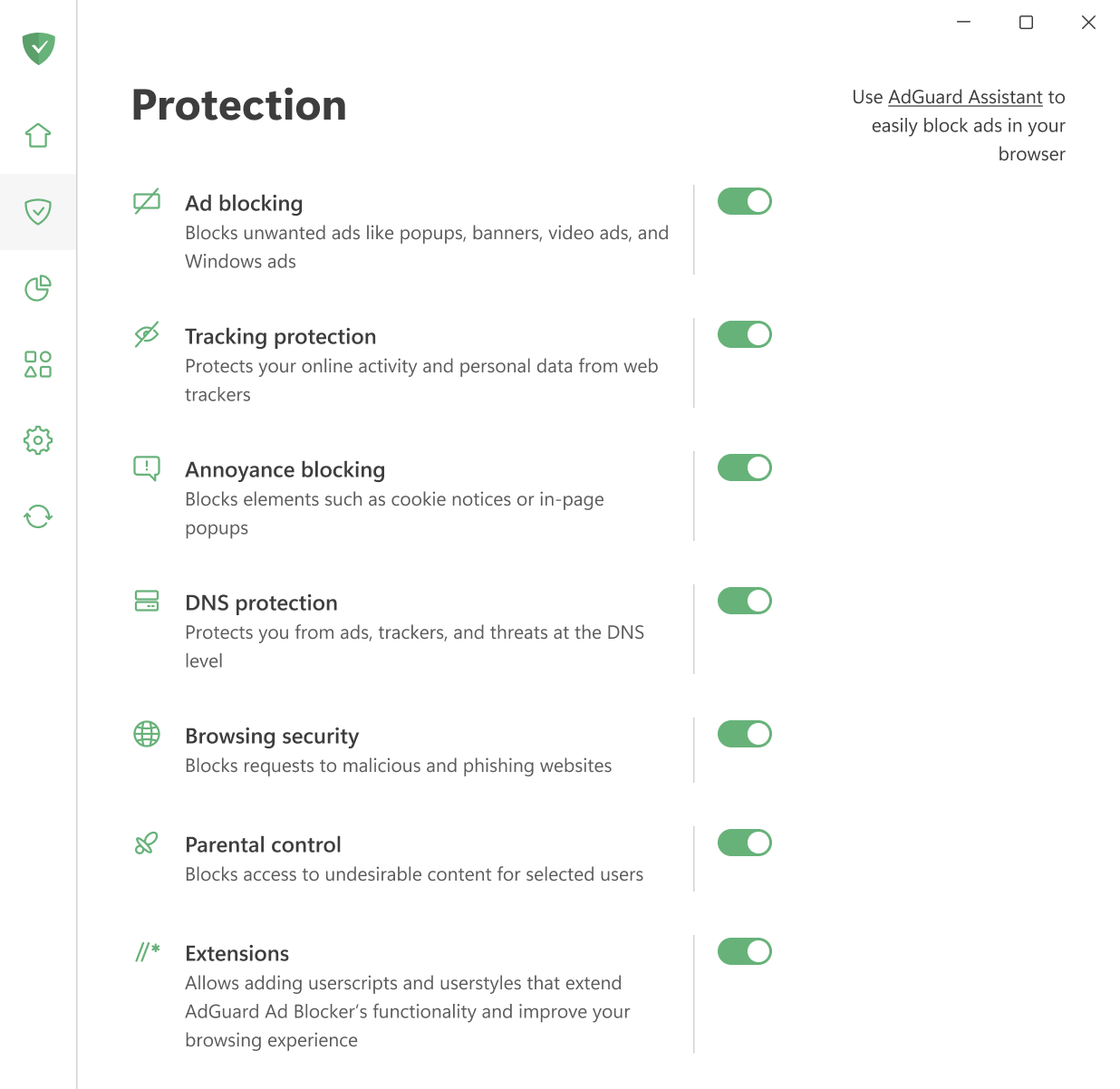 | ||
|
|
||
|
|
||
| The *Protection* tab contains all key security and filtering settings. Here you can control *Ad blocking*, *Tracking protection*, *Annoyance blocking*, *DNS filtering*, *Browsing security*, *Parental control*, and *Extensions*. You can also manage AdGuard Assistant here — a tool that lets you control its functionality without opening the app. Each of these features is described in a separate article. | ||
|
|
||
| [Ad blocking](/adguard-for-windows-8/protection/ad-blocking) | ||
|
|
||
| [Tracking protection](/adguard-for-windows-8/protection/tracking-protection) | ||
|
|
||
| [Annoyance blocking](/adguard-for-windows-8/protection/annoyance-blocking) | ||
|
|
||
| [DNS protection](/adguard-for-windows-8/protection/dns-protection) | ||
|
|
||
| [Browsing security](/adguard-for-windows-8/protection/browsing-security) | ||
|
|
||
| [Parental control](/adguard-for-windows-8/protection/parental-control) | ||
|
|
||
| [Extensions](/adguard-for-windows-8/protection/extensions) | ||
Oops, something went wrong.
Add this suggestion to a batch that can be applied as a single commit.
This suggestion is invalid because no changes were made to the code.
Suggestions cannot be applied while the pull request is closed.
Suggestions cannot be applied while viewing a subset of changes.
Only one suggestion per line can be applied in a batch.
Add this suggestion to a batch that can be applied as a single commit.
Applying suggestions on deleted lines is not supported.
You must change the existing code in this line in order to create a valid suggestion.
Outdated suggestions cannot be applied.
This suggestion has been applied or marked resolved.
Suggestions cannot be applied from pending reviews.
Suggestions cannot be applied on multi-line comments.
Suggestions cannot be applied while the pull request is queued to merge.
Suggestion cannot be applied right now. Please check back later.
There was a problem hiding this comment.
Choose a reason for hiding this comment
The reason will be displayed to describe this comment to others. Learn more.
Границы скрина не по канону