A Flask web application that tracks real-time equity prices for different companies in a MySQL database, graphs important statistical trends using React/Chart.js, integrated with a Black Scholes and Monte Carlo option pricing calculator.
- Python
- SQL
- TypeScript
- HTML/CSS
- Flask
- MySQL
- React
- Chart.js
- Makefile
- The user specifies a ticker as well as a start and end date.
- If the data does not already exist in the database, the daily price data is fetched using yfinance, which is then stored in a MySQL database.
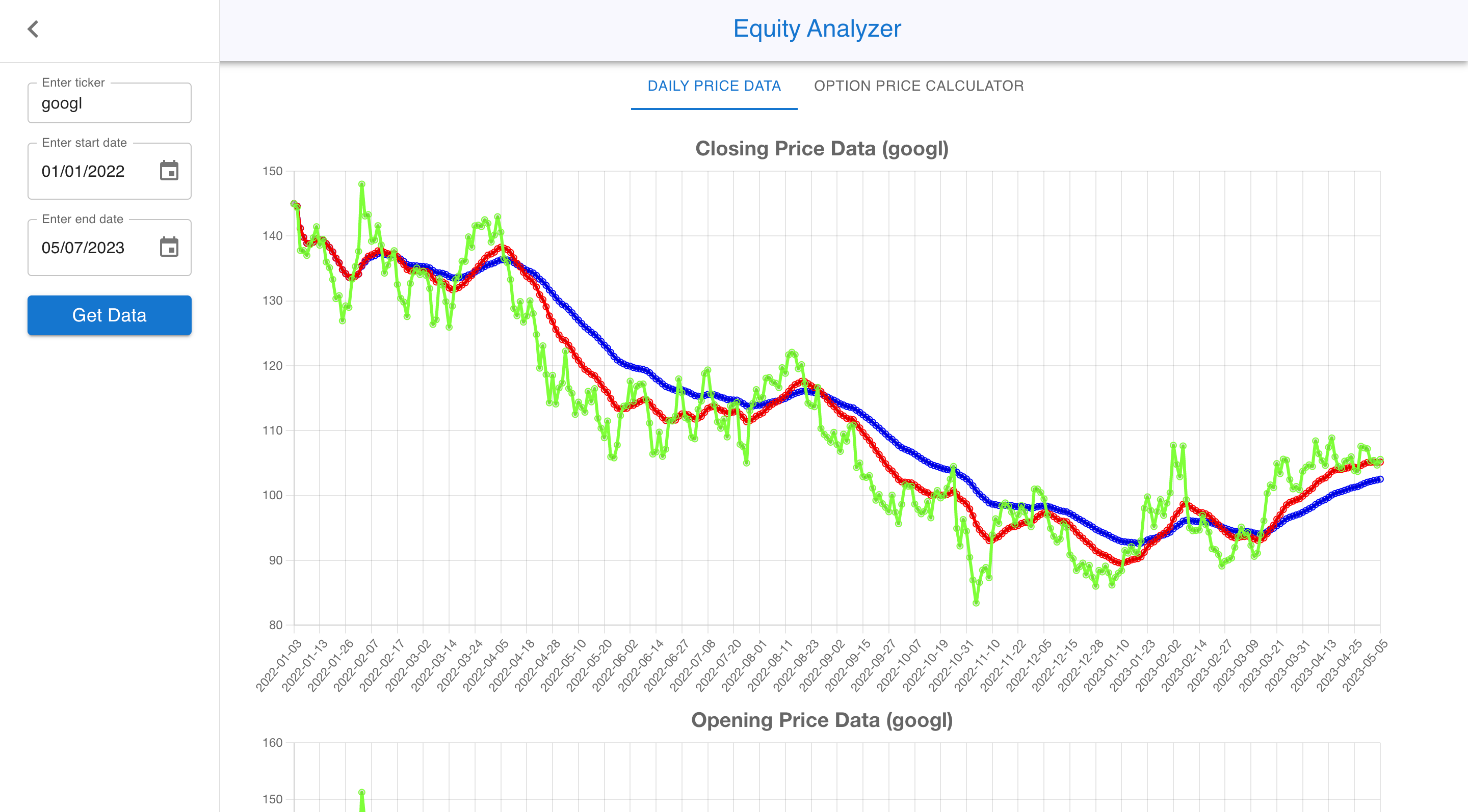
- The program retrieves the data and uses React and Chart.js to graph the open, high, low, close, and volume price for the specified period.
- On each graph, the 20-day (red line) and 50-day (blue line) weighted moving averages are shown.
- The option pricing calculator outputs the call and put prices from both the Black Scholes model as well as a Monte Carlo simultation given the underlying price, strike price, risk-free interest rate, volatility, and maturity, generating both theoretical prices and Greek values.

| Variable | Description |
|---|---|
| PYTHON_ENV | development or production |
| DB_HOST | Host address of database |
| DB_DATABASE | Database name |
| DB_USER | Username credentials |
| DB_PASSWORD | Password credentials |
Note: Backend Environment variables can be supplied via a .env file in the server directory. See ./server/example.env for an example
| Variable | Description |
|---|---|
| NODE_ENV | development |
Note: Frontend Environment variables can be supplied via a .env file in the client directory. See ./client/example.env for an example
To run the project, you will need to open two separate terminals.
- In the first terminal, run
make backend. This will install all the Python packages in a virtual environment and run the server on port 5000. - In the second terminal, run
make frontend. This will install all the TypeScript packages and run the application on port 3000. Open http://localhost:3000 to view the result in your browser.
| Command | Description |
|---|---|
make install_frontend |
Install all the frontend TypeScript packages |
make start_frontend |
Start the frontend without installing packages |
make install_backend |
Setup virtual environment and install backend Python packages |
make start_backend |
Start the server without installing packages |
make clean_backend |
Destroys the virtual environment and removes Python packages |