# **********************TO SEE PROGRAM SAMPLE***********************,
#     INSTALL PROGRAM, HIGHLIGHT THIS TEXT, PRESS LEFT ALT KEY
#                           我喜歡這個味道
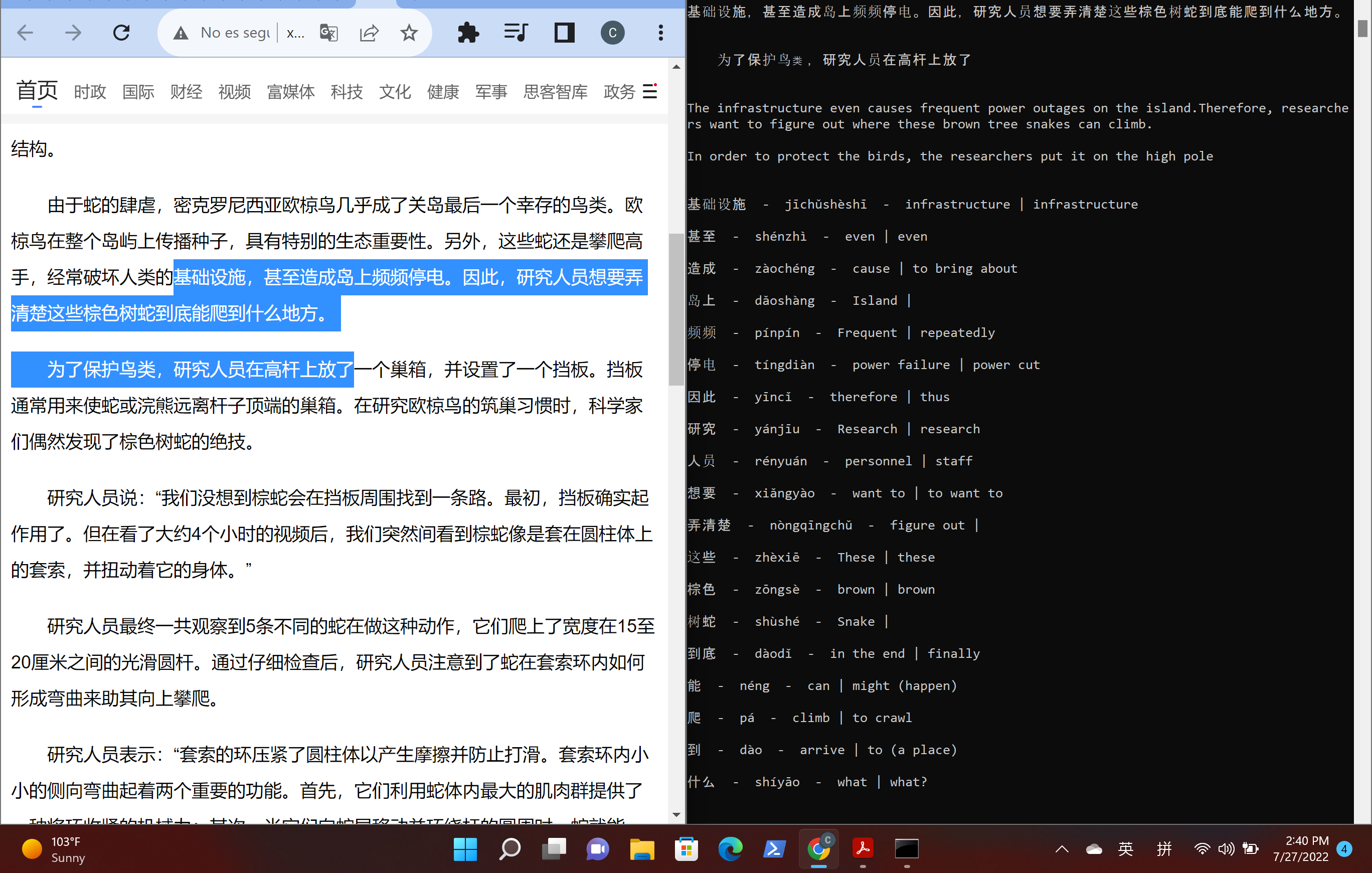
欢迎光临! [ 'welcome' for those who haven't used this app ;) ] This is an app designed to assist language studentsin learning chinese (that could also be easily adapted for another language).
Reading is an important part of learning a language, but personally I get frustrated reading when every sentence I encounter a word I've never seen before. I have to copy the word or phrase, and then change my window to google translate or online dictionary. Then, if the phrase has multiple unknown characters/words, I'm still left wondering which part of the phrase corresponds to each symbol
That's why I made this language-learning tool... I thought it would be cool if every time i saw an unknown word, that I could just highlight it with my mouse, press a button, and have another window on the screen that would instantly show the word-by-word translation.
This program has a key listener that waits for a key press (in my case the left alt key) Once pressed, the highlighted text on the screen will be copied, error-checked(filtered), and translated. I like having multiple translations for extra context because translating isn't always black and white
One translation will be pulled using the google translate package, and for other translations, I acquire by web scraping a chinese dictionary that I like (yabla). The program can be adapted to scrape from other chinese databases, and the number of desired translations can be chosen through the settings.py file in the app module
As of now I can only guarantee that the program will run on Windows, provided python3 is installed. Because of the key logging functionality, I haven't been able to get everything to work out of the box for linux (I've only tried using WSL server - Ubuntu 20.04). Theoretically pynput works with linux but there are some setup requirements. Even after getting an X server properly running for GUI functions the program wasn't logging the keys. I'm going to keep working on that But I have proven that but the program works following these steps:
- Have python3 installed without issues on a Windows computer
- Git clone project
- Create a virtual environment and run python -m pip install -r requirements.txt
- Manually run python -m pip install pynput and python -m pip install lxml
I wrote a series of small batch scripts to automate setting up the project. If the user already had python3 installed on a windows machine everything could theoretically be set up in less than 5 minutes. If needed, download python here.
Then to install run
git clone https://github.com/Repo-Factory/Learn-Chinese.git .
and then run the
install.bat
file. When it's done running, a terminal window inside the activated virtual environment will be on the screen, and all you have to do is type in
install2
in the cmd. Don't touch install1.bat file. After that it will install all dependencies and run the program automatically in about 20 seconds.