The AI Media Coverage Reporter is an automated tool that generates comprehensive media coverage reports based on email requests. Simply send an email with the correct subject format, and receive a detailed PDF report with screenshots and AI analysis
-
Actions separated into individual files:
src/actions/emailActions.js- Email sending functionalitysrc/actions/searchActions.js- Media source searchingsrc/actions/screenshotActions.js- Screenshot and PDF generation
-
Helper utilities organized:
src/utils/formatters.js- Number formatting and HTML table generationsrc/utils/composio.js- Composio PDF upload functionality
-
Express.js endpoint:
src/api/composio/webhook.js- Main webhook handler
Your webhook endpoint is now available at:
- POST
http://localhost:3001/api/v1/composio/webhook- Main webhook handler - GET
http://localhost:3001/api/v1/composio/webhook- Health check
The test curl
curl -X POST http://localhost:3001/api/v1/composio/webhook \
  -H "Content-Type: application/json" \
  -d '{
    "type": "gmail_new_gmail_message",
    "timestamp": "2025-08-19T10:29:16.943Z",
    "data": {
      "attachment_list": [],
      "id": "198...",
      "label_ids": ["UNREAD", "IMPORTANT", "CATEGORY_PERSONAL", "INBOX"],
      "message_id": "198c...",
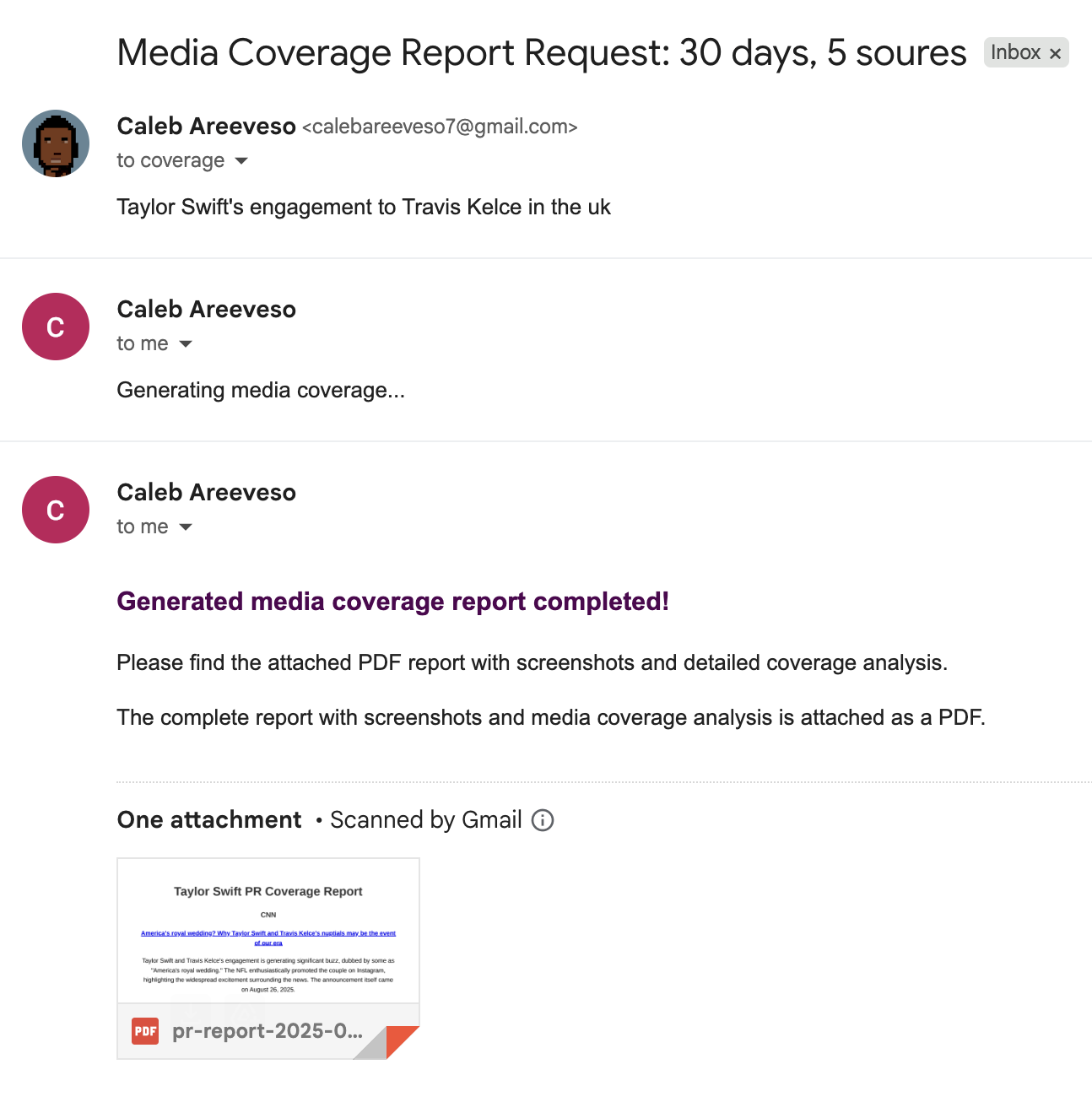
      "message_text": "Taylor Swift's engagement to Travis Kelce in the uk",
      "message_timestamp": "2025-08-19T10:28:58Z",
      "payload": {"body": {}, "filename": "", "headers": [], "mimeType": "multipart/alternative", "partId": "", "parts": []},
      "preview": {"body": "Taylor Swift's engagement to Travis Kelce in the uk", "subject": "Media Coverage Report Request"},
      "sender": "PR Agent <caleb@example.co>",
      "subject": "Media Coverage Report Request",
      "thread_id": "198c...",
      "to": "pr-ai-agent@example.com",
      "connection_id": "c24009c4-a380-41af-9ed7-4bda3e8028aa",
      "connection_nano_id": "ca_wx-s_W9T_oOV",
      "trigger_nano_id": "ti_ikxZE4xQMYoF",
      "trigger_id": "b3c...c",
      "user_id": "default"
    }
  }'
Note: Make sure to set your actual API keys in a .env file:
GOOGLE_API_KEY=your_actual_google_api_key
COMPOSIO_API_KEY=your_actual_composio_api_key
TAVILY_API_KEY=your_actual_tavily_api_key
AI_AGENT_EMAIL=ai_agent_email
This guide provides a comprehensive overview of the AI Media Coverage Reporter, an automated tool designed to streamline the process of generating media coverage reports. By simply sending an email, you can receive a detailed PDF report with screenshots and AI analysis.
To generate a report, send an email to the designated address with the correct subject line and a search query in the body.
The subject line of your email dictates the type of report you'll receive. You can use either a basic or advanced format.
Basic Format: Media Coverage Report Request
This format uses default settings: a time range of 30 days and 5 results.
Advanced Format with Custom Parameters: Media Coverage Report Request: [X]days, [Y] results
Customize your request by specifying the time range and the number of results.
Examples:
Media Coverage Report Request(Uses defaults: 30 days, 5 results)Media Coverage Report Request: 7days, 3 results(Retrieves 3 results from the last 7 days)Media Coverage Report Request: 14days, 10 results(Retrieves 10 results from the last 14 days)
Important Notes:
- The subject line is not case-sensitive.
- The specific wording after the numbers (e.g.,
days,sources,results) does not affect the output. - If you only want to specify a time range, use
Media Coverage Report Request: [X]days. - If you only want to specify the number of results, you must still include the time range with a comma. For example:
Media Coverage Report Request: 30days, 8 results.
The body of the email should contain your specific search query. This is the information the AI will use to research and analyze media coverage.
Tips for Better Results:
- Be specific but concise.
- Include relevant keywords.
- Mention specific brands, people, or events.
- Add geographical restrictions if needed, such as "
UK news only."
Examples:
"Taylor Swift's engagement to Travis Kelce in the uk""Tesla cybertruck launch coverage""Netflix quarterly earnings news"
After sending your request, you'll get two emails in quick succession: an immediate acknowledgment and the final report.
A confirmation email will be sent to you shortly after your request, confirming that the system is processing your report.
Within a few minutes, you'll receive the final email containing your comprehensive report.
The PDF Report Includes:
- An AI-generated executive summary.
- Screenshots and links of relevant media coverage.
- Professional formatting, ready for client presentations.
This section outlines the parameters you can use to customize your requests.
- Default: 30 days
- Range: Any positive number
Examples: 7days (last 7 days of coverage) or 2 days (last 2 days of coverage)
- Default: 5 results
- Range: Any positive number (recommended range is 3-15)
Examples: 3 results (3 media sources) or 10 sources (10 media sources)
Here are a few templates to help you get started.
Template 1: Basic Request
- Subject:
Media Coverage Report Request - Body:
Taylor Swift's engagement to Travis Kelce in the uk
Template 2: Quick Turnaround
- Subject:
Media Coverage Report Request: 3days, 5 results - Body:
Samsung Galaxy S24 announcement media coverage
Template 3: Comprehensive Analysis
- Subject:
Media Coverage Report Request: 14days, 12 results - Body:
Microsoft AI partnership announcements and industry reactions
Template 4: Crisis Monitoring
- Subject:
Media Coverage Report Request: 1days, 15 results - Body:
Company data breach news coverage and public response