A light weight gauge view written in SwiftUI.
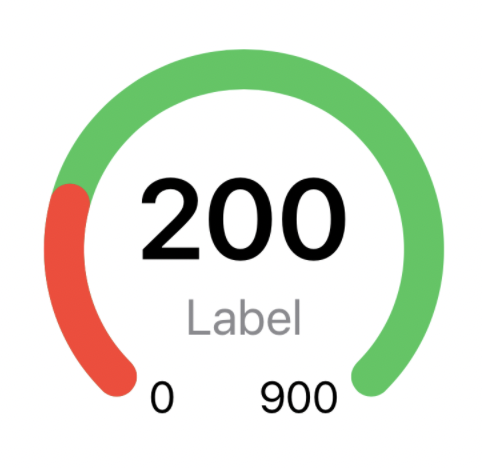
Xcode 11 and iOS 15 or MacOS 10.15 is required.
- Xcode: File -> Swift Packages -> Add Package Dependencies.
- Paste https://github.com/doobox/Benchmark.git
Drag Benchmark.swift into your project.
Import the Benchmark in the file you would like to use it:
import BenchmarkBenchmark(progress: 45, maxValue: 180, label: "Label", color1: .red, color2: .green, counterColor: .primary, labelColor: .secondary, minMaxColor: .primary, showLabel: true, showMinMax: true)
.frame(width: 300)| Argument | Type | Description |
|---|---|---|
| progress | CGFloat | Value for the current gauge position. |
| maxValue | CGFloat | The maximum value of the gauge. |
| label | String | The text label in the gauge. |
| color1 | Color | The left gauge color. |
| color2 | Color | The right gauge color. |
| counterColor | Color | The gauge value text color. |
| labelColor | Color | The label color. |
| minMaxColor | Color | The min and max values color. |
| showLabel | Bool | Show or hide the label. |
| showMinMax | Bool | Show or hide the min max gauge values. |
Benchmark is distributed under the terms and conditions of the MIT license.
Benchmark is brought to you by Doobox Software. If you're using Benchmark in your project, attribution would be very appreciated.