An Electron-based browser with an AI-powered Codex sidebar for intelligent web automation.
🌐 Website: www.gnunae.com | 📺 YouTube: @GnuNae
⚠️ Alpha Warning: This app is still in alpha stage. Do not use it in production or with sensitive data.
graph TB
    subgraph Electron["Electron App"]
        Main["Main Process<br/>(main.ts)"]
        Preload["Preload Script<br/>(preload.ts)"]
        MCP["MCP Server<br/>(mcp-server.ts)"]
    end

    subgraph UI["React UI"]
        App["App.tsx"]
        Sidebar["CodexSidebar"]
        AddressBar["AddressBar"]
        Settings["Settings"]
    end

    subgraph Browser["BrowserView"]
        WebPage["Web Content"]
    end

    subgraph External["External Services"]
        Codex["Codex CLI"]
        OpenAI["OpenAI API"]
        Playwright["Playwright MCP"]
    end

    Main --> Preload
    Main --> MCP
    Main --> Browser
    Preload <--> UI
    UI --> Sidebar
    Sidebar --> |IPC| Codex
    Codex --> OpenAI
    Codex --> Playwright
    Playwright --> |DOM Control| Browser
    MCP --> |Snapshot/Actions| Browser
| Component | Description |
|---|---|
| Main Process | Electron main, window management, IPC handlers |
| BrowserView | Chromium-based web content rendering |
| React UI | Sidebar, address bar, settings overlay |
| Codex CLI | OpenAI's CLI for AI-powered automation |
| MCP Server | Model Context Protocol for browser control |
| Playwright MCP | DOM interaction and page automation |
- 🌐 Full Browser - Chrome-based web browser with address bar and navigation
- 🪟 Multi-Window - Open multiple independent windows (Cmd/Ctrl+N)
- 📑 Multi-Tab - Multiple tabs per window with tab bar
- 🤖 Codex Sidebar - AI assistant powered by OpenAI's Codex CLI
- 📋 Task Manager - Save, schedule, and run automated tasks
- 🔐 OpenAI Auth - Sign in with your OpenAI account
- 🔧 Page Analysis - Codex can see and analyze your current page
- 🎯 MCP Integration - Model Context Protocol for browser control
- 💾 Personal Data Store (PDS) - Persistent storage for user data that Codex can access and update
- ⏰ Scheduled Tasks - Run tasks hourly, daily, or weekly at specific times
⚠️ Failure Detection - Automatic detection of CAPTCHA, 2FA, and login blocks
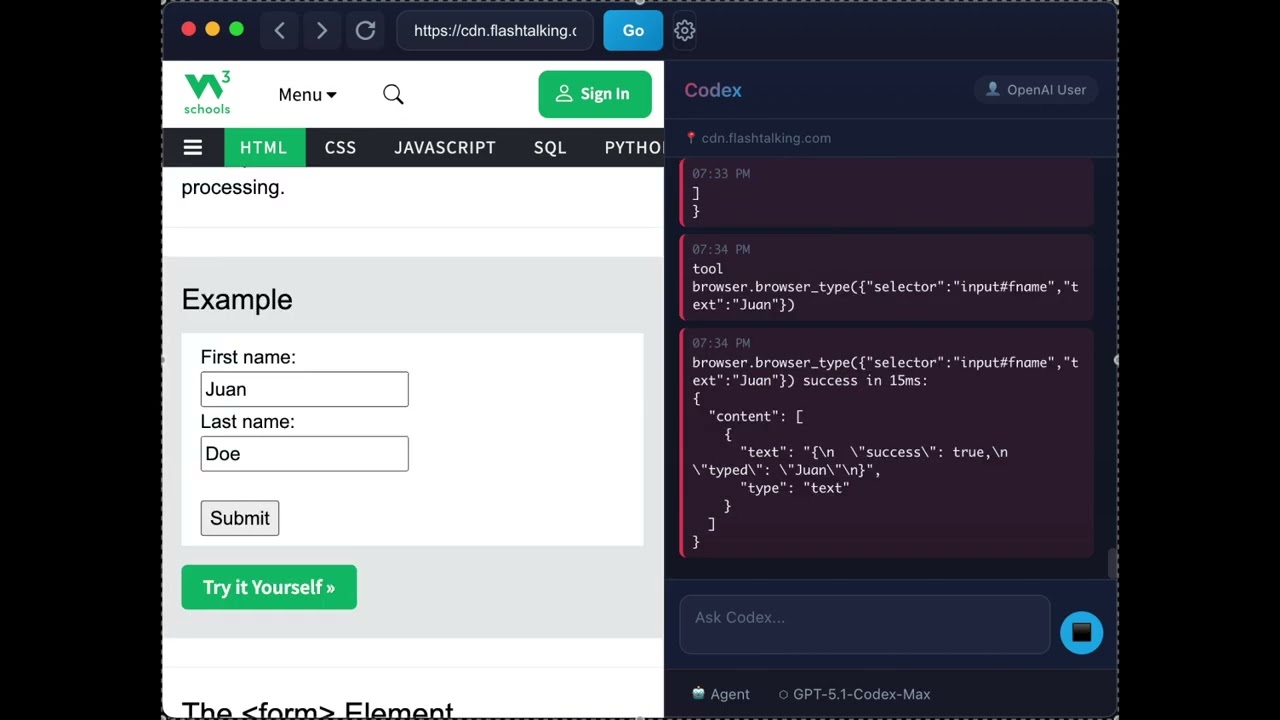
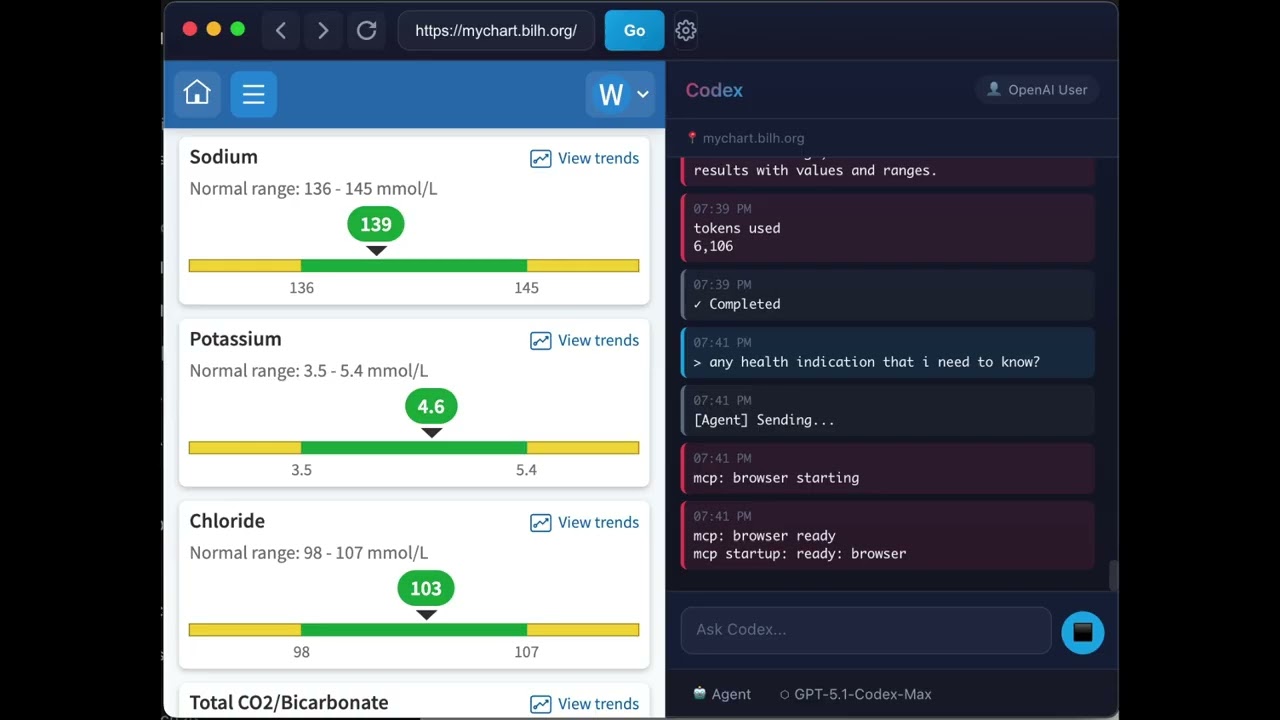
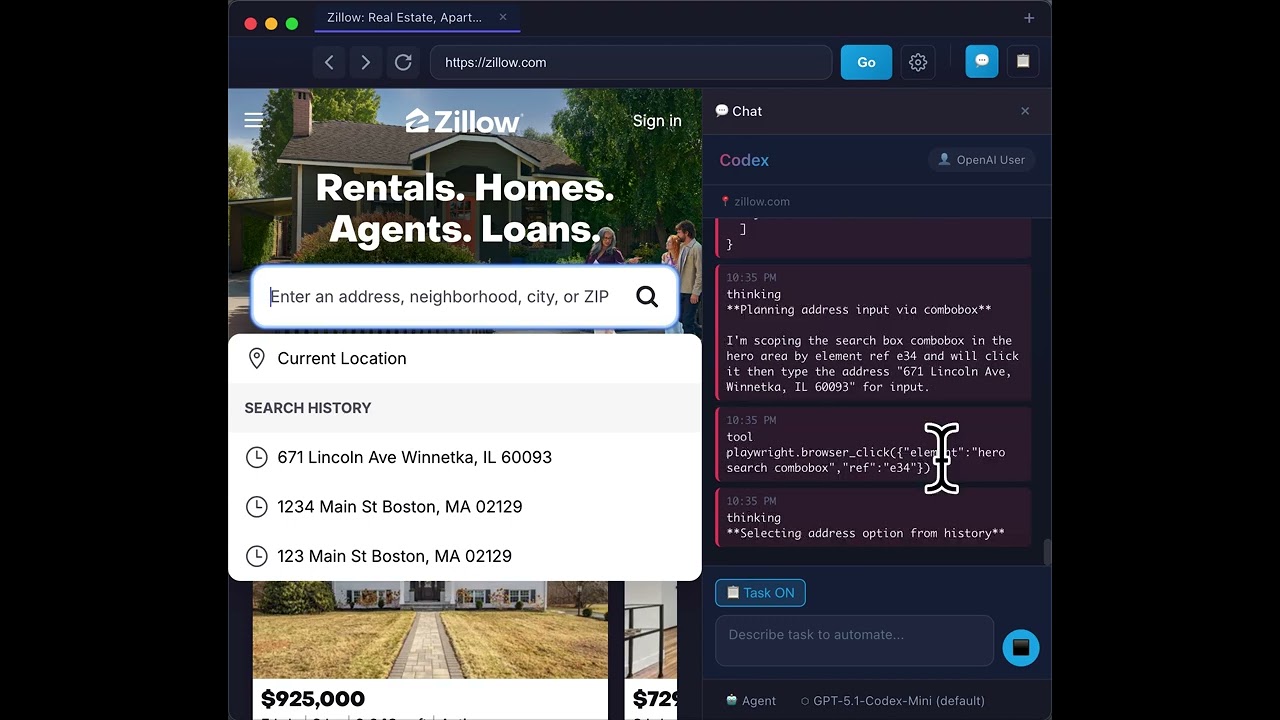
- Node.js 18+
- npm or yarn
- ChatGPT Pro or Plus subscription (required for Codex CLI)
- Free ChatGPT accounts cannot use Codex features
- Upgrade at: https://chat.openai.com/settings/subscription
# Clone the repository
git clone https://github.com/fkiller/GnuNae.git
cd GnuNae

# Install dependencies
npm install

# IMPORTANT: Authenticate with OpenAI (first-time only)
npx codex auth openai

# Build the application
npm run build

# Run in development
npm run start
⚠️ First-time users: You must runnpx codex auth openaito authenticate with OpenAI before using the app. This is a one-time setup.
- Launch the app - A browser window opens with a sidebar
- Sign in - Click "Sign in to OpenAI" in the sidebar
- Navigate - Use the address bar to visit any website
- Ask Codex - Type a prompt in the sidebar (e.g., "list all links on this page")
- Get results - Codex analyzes the page and responds
- "Summarize this page"
- "Find all job listings mentioning Python"
- "What are the main topics covered here?"
- "Google my address" (Codex will ask for your address and remember it)
- "Store all property information" (Codex extracts and saves data from the page)
The PDS allows Codex to remember your personal information across sessions:
- Automatic Prompting - When Codex needs info (email, address, etc.), a smart card appears for you to enter it
- Persistent Storage - Data is saved to
~/.gnunae/datastore.jsonand reused automatically - Web Extraction - Ask Codex to "store" information from pages (e.g., property details from Zillow)
- Manage in Settings - View, edit, or delete stored data in the Settings panel
Example workflow:
You: "Search my address on Zillow"
Codex: [Shows smart card asking for address]
You: [Enter "123 Main St, Boston MA"]
Codex: [Searches Zillow, saves address for future use]
When you send a prompt, GnuNae constructs the full prompt in this order:
| Order | Component | Description |
|---|---|---|
| 1 | Mode Instructions | Behavior constraints based on mode (Ask/Agent/Full Access) |
| 2 | Pre-Prompt | System instructions from Settings |
| 3 | User Data Context | Personal data from the Data Store |
| 4 | Page Context | Current URL, title, and page content |
| 5 | User Prompt | Your actual request |
Mode behaviors:
| Mode | Behavior |
|---|---|
| 💬 Ask | Read-only - can only describe page, refuses to click/submit/navigate |
| 🤖 Agent | Confirms critical actions (payments, final submissions, account changes) |
| ⚡ Full Access | 100% autonomous - no confirmations needed |
# macOS
npm run pack:mac

# Windows
npm run pack:win

# Linux
npm run pack:linuxCodex settings are stored in ~/.codex/config.toml:
model = "gpt-5.1-codex-max"
model_reasoning_effort = "xhigh"

[mcp_servers.browser]
command = "node"
args = ["/path/to/scripts/mcp-server.cjs"]src/
├── electron/ # Main process
│ ├── main.ts # App entry, window management, IPC handlers
│ ├── preload.ts # Context bridge for renderer
│ └── mcp-server.ts # MCP server for browser control
├── ui/ # Renderer process (React)
│ ├── index.tsx # React entry point
│ ├── App.tsx # Main UI layout
│ ├── App.css # Global styles
│ └── components/
│ ├── AddressBar.tsx # URL navigation bar
│ ├── CodexSidebar.tsx # AI assistant sidebar
│ ├── DataRequestCard.tsx # Smart card for PDS data requests
│ ├── TaskManager.tsx # Task Manager panel
│ ├── RightPanel.tsx # Chat/Task Manager wrapper
│ ├── SaveTaskCard.tsx # Save task prompt card
│ ├── TabBar.tsx # Multi-tab bar
│ ├── Settings.tsx # Settings panel (includes PDS editor)
│ └── About.tsx # About dialog
└── core/ # Shared utilities
├── auth.ts # OpenAI authentication
├── datastore.ts # Personal Data Store service
├── tasks.ts # Task service and scheduler
├── settings.ts # App settings & pre-prompt
├── schema.ts # Type definitions
└── vault.ts # Secure storage
docs/ # GitHub Pages (gnunae.com)
├── index.html # Landing page
├── CNAME # Custom domain
└── assets/ # Logo, videos
.github/workflows/
└── release.yml # CI/CD for multi-platform builds
- Electron - Desktop app framework
- React - UI library
- TypeScript - Type safety
- Vite - Build tool
- OpenAI Codex - AI code assistant
| Status | Feature |
|---|---|
| ✅ Done | Electron-based browser integrated with Codex-Playwright MCP |
| ✅ Done | Multi-window support with isolated Codex sessions |
| ✅ Done | Multi-tab support with tab bar |
| ✅ Done | Personal Data Store (PDS) - persistent storage with smart card UI |
| ✅ Done | Two-way PDS integration - Codex can request AND store data |
| ✅ Done | Task Manager - save, schedule, and automate tasks |
| 🔜 Planned | Edge/Chrome extension mode with GnuNae sidebar/backend |
| 🔜 Planned | Project management for multi-page workflows |
| 🔜 Planned | More LLM options including local LLM support |
- Multi-Window Support
- Open multiple independent GnuNae windows (Cmd/Ctrl+N)
- Each window has isolated Codex sessions and working directory
- Window-specific tab management and automation
- Playwright MCP correctly targets each window's webview
- Stability Improvements
- Fixed iframe navigation polluting address bar URL
- Protected application UI from accidental Playwright navigation
- Improved tab selection guidance in pre-prompt
- Task Execution System
- Save prompts as reusable tasks with one-time, on-going, or scheduled triggers
- Task Manager panel with favorites, running tasks, and scheduled countdowns
- Background scheduler for automated task execution
- Max concurrency setting (1-5 simultaneous tasks)
- Failure Handling
- CAPTCHA/2FA/login detection with warning cards
- Menu Enhancements
- Settings accessible from App menu (⌘,)
- View menu: Show Chat (⌘1), Task Manager (⌘2), Hide Panel (⌘0)
- About dialog with open source library attributions
- UI Improvements
- Chat/Task Manager toggle buttons in address bar
- Collapsible right panel with dynamic browser resizing
- Personal Data Store (PDS) with smart card UI
- Multi-tab browser support
- Initial release
- Codex sidebar with OpenAI integration
- MCP-based browser automation
MIT
Contributions welcome! Please open an issue or PR.
Built with ❤️ for AI-powered browsing