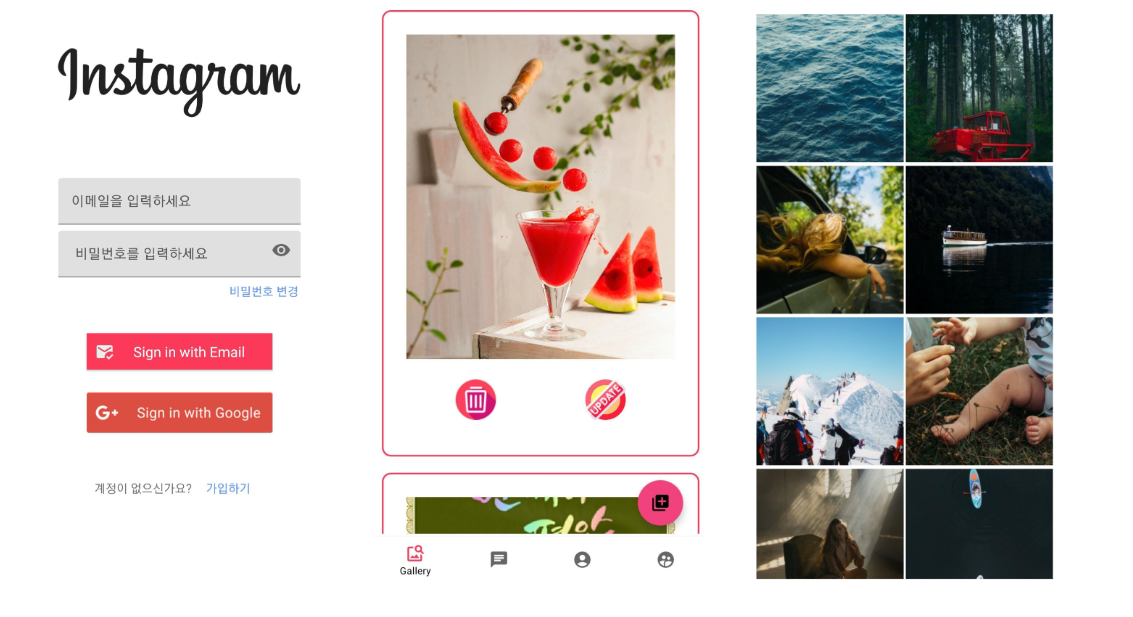
DW_Insta is a fully-functional Instagram-inspired Android application built with Java and Firebase. This project demonstrates modern Android development practices including user authentication, real-time messaging, image sharing, and social networking features.
Package: com.kaywalker.newone
DW_Insta_01.mp4
- Email/password authentication
- Google Sign-In integration
- User profile management with avatar upload
- Profile viewing and editing
- Photo feed with real-time updates
- Image upload with caption support
- User discovery and search
- Follow/unfollow functionality
- Direct messaging between users
- Real-time chat synchronization
- Message history persistence
- Gallery integration for photo selection
- Full-screen image viewing
- Image optimization and caching
- Profile picture upload and management
- Language: Java 1.8
- SDK: Compile/Target SDK 32, Minimum SDK 23 (Android 6.0)
- Build System: Gradle 7.x
- Authentication: Email/password and Google Sign-In
- Realtime Database: User data and messaging storage
- Cloud Storage: Profile images and content storage
| Library | Version | Purpose |
|---|---|---|
| Glide | 4.13.0 | Primary image loading and caching |
| Picasso | 2.8 | Image loading support |
| Firebase Auth | latest | User authentication |
| Firebase Database | latest | Real-time data synchronization |
| Firebase Storage | latest | Cloud file storage |
| Material Components | latest | Modern UI components |
IntroActivity (Splash)
    ↓
MainActivity (Login/Registration)
    ↓
CenterActivity (Main Hub)
    ├── Frag_Home (Feed)
    ├── Frag_Board (Gallery)
    ├── Frag_Profile (User Profile)
    └── Frag_List (User Discovery)
Activities:
IntroActivity: Splash screen with app initializationMainActivity: Authentication gateway (login/signup)CenterActivity: Main navigation hub with bottom navigationAddActivity: Content upload interfaceChatActivity: Direct messaging screenUserActivity: Profile viewing screenFullScreenActivity: Full-screen image viewer
Fragments:
Frag_Home: Main feed displaying user postsFrag_Board: Gallery view of all imagesFrag_Profile: User profile managementFrag_List: User discovery and search
Data Models:
UserAccount: User profile informationImage: Post content and metadataChatDTO: Chat message datadataholder: Temporary data transfer
firebase-root/
├── Users/
│   └── [userId]/
│       ├── name
│       ├── email
│       ├── profileImageUrl
│       └── ...
├── Posts/
│   └── [postId]/
│       ├── imageUrl
│       ├── caption
│       ├── userId
│       └── timestamp
└── Chats/
    └── [chatId]/
        ├── messages
        └── participants
- Android Studio Arctic Fox or newer
- JDK 1.8 or higher
- Android SDK 32
- Firebase account and project setup
- Google Sign-In credentials (OAuth 2.0)
- Clone the repository
git clone https://github.com/kaywalker91/Android_DW_Insta.git
cd Android_DW_Insta- Firebase Configuration
- Create a new Firebase project at Firebase Console
- Enable Authentication (Email/Password and Google Sign-In)
- Enable Realtime Database
- Enable Cloud Storage
- Download
google-services.jsonand place it inapp/directory
- Configure Google Sign-In
- Enable Google Sign-In in Firebase Authentication
- Add SHA-1 and SHA-256 fingerprints to Firebase project
- Download updated
google-services.json
- Build the project
# Install dependencies
./gradlew build

# Run debug build
./gradlew installDebug# Build APK
./gradlew assembleDebug # Debug APK
./gradlew assembleRelease # Release APK
# Testing
./gradlew test # Unit tests
./gradlew connectedAndroidTest # Instrumented tests
# Installation
./gradlew installDebug # Install debug build on device
# Clean build
./gradlew cleanThe app requires the following permissions (declared in AndroidManifest.xml):
INTERNET: Network communicationREAD_PHONE_STATE: Device informationREAD_EXTERNAL_STORAGE: Gallery accessWRITE_EXTERNAL_STORAGE: File storage (SDK < 29)
Authority: com.kaywalker.newone
Configured for secure file sharing between app and external apps (camera, gallery).
- Launch the app
- Create an account or sign in with Google
- Set up your profile with name and profile picture
- Grant necessary permissions when prompted
Upload a Photo:
- Tap the "+" button in the bottom navigation
- Select an image from gallery
- Add a caption (optional)
- Tap "Upload"
Direct Messaging:
- Navigate to a user's profile
- Tap the message icon
- Send messages in real-time
View Feed:
- Home tab shows posts from all users
- Scroll to load more content
- Tap images for full-screen view
Manage Profile:
- Profile tab shows your posts and information
- Edit profile to update name and avatar
- View your post history
app/src/main/
├── java/com/kaywalker/newone/
│   ├── activities/
│   │   ├── IntroActivity.java
│   │   ├── MainActivity.java
│   │   ├── CenterActivity.java
│   │   ├── AddActivity.java
│   │   ├── ChatActivity.java
│   │   ├── UserActivity.java
│   │   └── FullScreenActivity.java
│   ├── fragments/
│   │   ├── Frag_Home.java
│   │   ├── Frag_Board.java
│   │   ├── Frag_Profile.java
│   │   └── Frag_List.java
│   ├── models/
│   │   ├── UserAccount.java
│   │   ├── Image.java
│   │   ├── ChatDTO.java
│   │   └── dataholder.java
│   └── adapters/
│       └── [RecyclerView adapters]
├── res/
│   ├── layout/
│   ├── drawable/
│   └── values/
└── AndroidManifest.xml
{
  "rules": {
    "Users": {
      "$uid": {
        ".read": "auth != null",
        ".write": "$uid === auth.uid"
      }
    },
    "Posts": {
      ".read": "auth != null",
      ".write": "auth != null"
    }
  }
}service firebase.storage {
match /b/{bucket}/o {
match /profile_images/{userId}/{allPaths=**} {
allow read: if request.auth != null;
allow write: if request.auth != null && request.auth.uid == userId;
}
match /post_images/{allPaths=**} {
allow read: if request.auth != null;
allow write: if request.auth != null;
}
}
}
- Minimum SDK 23 (Android 6.0+) required
- Google Sign-In requires proper SHA fingerprint configuration
- Storage permissions needed for Android 10 and below
- Image upload size may be limited by Firebase Storage quotas
# Clean build artifacts
./gradlew clean
./gradlew build --refresh-dependencies- Verify
google-services.jsonis inapp/directory - Check Firebase project configuration
- Ensure Firebase dependencies are up to date
- Verify internet connectivity
- Confirm SHA-1 and SHA-256 fingerprints are added to Firebase
- Download updated
google-services.jsonafter adding fingerprints - Check OAuth 2.0 client ID configuration
- Grant storage permissions in device settings
- For Android 11+, check scoped storage compatibility
Contributions are welcome! To contribute:
- Fork the repository
- Create a feature branch (
git checkout -b feature/AmazingFeature) - Commit your changes (
git commit -m 'Add some AmazingFeature') - Push to the branch (
git push origin feature/AmazingFeature) - Open a Pull Request
- Follow Java coding conventions
- Add comments for complex logic
- Test on multiple Android versions
- Update documentation for new features
./gradlew test./gradlew connectedAndroidTestRequires a connected device or emulator.
This project is open-source and available for educational purposes.
- kaywalker91 - Initial development
- claude - Documentation and enhancements
- Firebase for backend infrastructure
- Glide and Picasso for image loading
- Material Design components
- Android Developer community
For questions or support, please open an issue on GitHub.
Note: This is an educational project demonstrating Android development practices. For production use, implement additional security measures, error handling, and optimization.