

Easily add custom warnings and errors to your Xcode project's build process
$ gem install maydayCreate a Maydayfile
$ mayday initAdd some warning and error checks to that file
# Maydayfile

# Required
xcode_proj "CoolApp.xcodeproj"

# Use regular expressions to define errors or warnings on a line-by-line basis
error_regex "Please remove Copyright boilerplate", /^\/\/  Copyright \(c\).*$/, :files => "*AppDelegate*"
warning_regex "TODO", /^\/\/\s+TODO:.*$/
You can do more advanced checks, too, with blocks
# Maydayfile

warning :line, :exclude => "Fixtures/SomeDir/Excluded/*" do |line|
  line.length > 120 ? "Length of line #{line.length} is longer than 120 characters!" : false
end

# You can get the whole file, too
error :file do |entire_file|
  max_number_of_lines = 500

  number_of_code_or_comment_lines = entire_file.split("\n").select { |line| line.strip.length > 0 }.count
  if number_of_code_or_comment_lines > max_number_of_lines
    # Map line numbers to errors
    { "1" => "File is #{number_of_code_or_comment_lines} lines long" }
  else
    false
  end
end
When you're ready, run
$ maydayNext time you build your project, your errors and warnings will be flagged
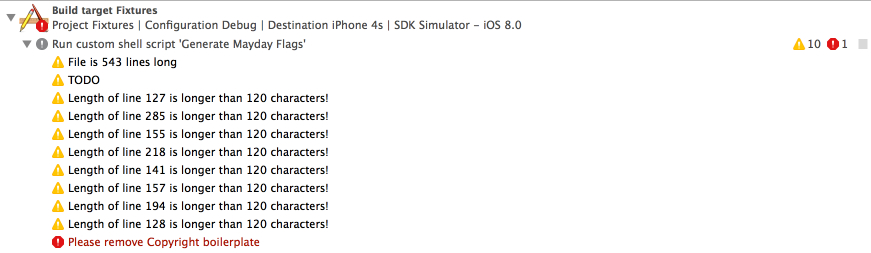
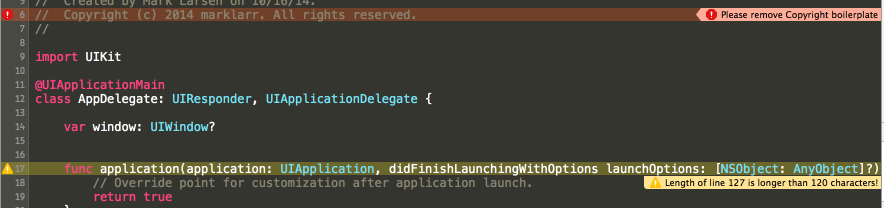
You can also run mayday from the command line
$ mayday runYou also have the option to choose the file specifying the project and rules (by default this will be Maydayfile) using
$ mayday run --rules MyRulesFileSince Ruby is installed by default on OSX, the warnings and errors will work for anybody building your project, even if they don't have RVM, RubyGems, or mayday.
warning, error, warning_regex, and error_regex all accept an options hash with any of the following options
languagelimits to files in the provided language. Accepts"swift"and"objective-c".warning :line, :language => "swift" do ...
fileslimits to files that have an absolute path that matches the provided globs. Accepts an array.warning_regex "Foo!", /^barbaz$/, :files => ["*.h"] do ...
exclusionsdoesn't run on files that have an absolute path that matches the provided globs. Accepts an array.warning :line, :exclude => ["*/Pods/*"] do ...Note, Pods are excluded by default by mayday
For some ideas on how to start using mayday, see the cookbook
You may be concerned about how much overhead this will add to your build process. To see how quickly your mayday checks execute, use
$ mayday benchmarkmaydayuses sourcify to write your customwarninganderrorsblocks to a build phase, all gotchas in sourcify apply to your blocks.maydaycopies your custom blocks, line for line, into a build phase, so all variables inside of them must be of local scope. Anything defined outside of a custom block will not be included in the build phase.- Gems cannot be used inside of custom blocks, only vanilla, system Ruby.
- If your custom blocks have errors in them that aren't found until they're executed (which is done whenever you call
mayday), the stack trace won't be very helpful in debugging (because there is no source map from the build phase back to yourMaydayfilecode) - Generating efficient code to write into the build phase is difficult. The code generated by
MayDay::ScriptGenerator#to_rubycould definitely be optimized.
$ mayday downWe'd love to see your ideas for improving this library! The best way to contribute is by submitting a pull request. We'll do our best to respond to your patch as soon as possible. You can also submit a new GitHub issue if you find bugs or have questions. 
Please make sure to follow our general coding style and add test coverage for new features!