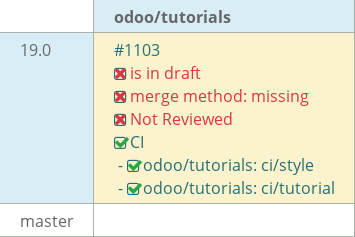
19.0 tutorials kukor #1103
19.0 tutorials kukor #1103
Conversation


1. Architecture Overview
2. A New Application
Fixed the white space error, added a space after the colon ( : ).
{
    'name': 'Real Estate',
    'author': 'Kunj Koradiya',
    'description': 'This is the description'
}
Added space after each colon.
Added the line after the end of the code
{
    'name': 'Real Estate',
    'author': 'Kunj Koradiya',
    'description': 'This is the description'
}

Added a new line at the end.
Fixed the white space error, which was at the end of the line in the description

    'description': 'This is the description'

Removed the space from the end of the line
Fixed the license error, which later added at the last

'license': 'LGPL-3'

Added the license

|
|
-Added the initial estate property model with basic fields.
-Configured access rights via ir.model.access.csv to enable CRUD operation.
-Introduced menu items to expose the model in the UI.
-Created custom list, form, and search views to replace default generic views.
-Improved usability by defining proper field layouts and search filters.

Completed Chapter 3-6
-Removed the unwanted imports from the estate_property.py

Completed chapter 3-6
- Added property types, tags, and offers models with views
- Linked properties with buyer, salesperson, types, tags, and offers
- Displayed offers and relations in property views

Completed the Chapter 7
- Fixed the line Spacing in the __init__.py file

Completed the Chapter 7

 mash-odoo
left a comment
mash-odoo
left a comment
mash-odoo
left a comment
There was a problem hiding this comment.
Hello @kukor-odoo,
Nice start for the module.
Please apply the suggested changes wherever necessary.
- Updated naming conventions for models and views
- Cleaned up imports, spacing, and unnecessary attributes
- Aligned selection fields and filters with Odoo standards
- Removed the comma
buyer_id = fields.Many2one('res.users')
Add a computed field `best_price` on `estate.property`, calculated from the
highest offer price (using `@api.depends`). Also implement an `@api.onchange` on
the `garden` field to set default values for `garden_area` and `garden_orientation`.

Completed Chapter 8
- Replaced inconsistent use of single and double quotes across Python files.
- Fixed quote usage in the manifest file to align with coding standards.
- Added server actions and buttons to manage property state transitions
- Implemented logic to accept/refuse offers and mark properties as sold
- Added SQL constraints to ensure valid and consistent data
- Added Python constraints to enforce business rules on pricing

Completed Chapters 9 and 10
- Resolved the traceback issue in the estate module.
- Removed the unnecessary property_id field from the offer form, as it is not required.
 kukor-odoo
force-pushed
the
19.0-tutorials-kukor
branch
from
kukor-odoo
force-pushed
the
19.0-tutorials-kukor
branch
from
543fb53 to
7dde16c
Compare
- Improve estate views following the Sprinkles tutorial.
- Add list decorations, inline editing, and statusbar widgets.
- Apply deterministic ordering and sequence handling.
- Enhance overall UI clarity and usability.
kukor-odoo
force-pushed
the
19.0-tutorials-kukor
branch
from
cf9976a to
bb1dd37
Compare
- Implement maintenance tracking with title, cost, and status fields.
- Prevent property sale when maintenance requests are pending and calculate total maintenance costs.
kukor-odoo
force-pushed
the
19.0-tutorials-kukor
branch
from
de376d5 to
2ab5de2
Compare
mash-odoo
left a comment
mash-odoo
left a comment
There was a problem hiding this comment.
Hello,
Good going on this task..
Please go through my questions and suggestions
| ) | ||
| property_type_id = fields.Many2one( | ||
| related='property_id.property_type_id', store=True) | ||
| check_button = fields.Char(store=False) |
There was a problem hiding this comment.
Is there a need to add store=False here, also why is it a Char field?
There was a problem hiding this comment.
I used store=False because I didn’t want the field to be stored in the database—it was only needed temporarily for some logic that would change later. Initially, the field was a Boolean, but I later changed it to a Char field.
The reason check_button is a Char field is that I needed to pass a string value from it to the XML file. I switched from Boolean to Char so I could pass a string instead and observe the change, but I didn’t notice any difference.
| <field name="name">estate.property.offer.view.list</field> | ||
| <field name="model">estate.property.offer</field> | ||
| <field name="arch" type="xml"> | ||
| <list string="Channel" editable="bottom" decoration-success="status == 'accepted'" |
There was a problem hiding this comment.
Yes, we can use a decorator in the form view, for example:
<field name="facades" decoration-success="garden == True"/>
When the garden field is checked, the value of facades will be displayed in green.
| <group> | ||
| <group> | ||
| <field name="state" string="Status"/> | ||
| <field name="property_type_id" options="{'no_create': True, 'no_edit': True}"/> |
There was a problem hiding this comment.
What's the purpose of adding these options?
There was a problem hiding this comment.
This option allows the user to select only from the already created property types. Normally, Odoo provides the ability to create or edit a value directly from the selection field. However, option 'no_create': True prevents the user from creating new records, and option 'no_edit': True removes the option to edit existing records while selecting a property type in the form view.


As shown in the screenshots above, only the two existing property types are available for selection. The user must choose one of these and cannot create a new type or modify an existing one from the dropdown.
| <field name="garden"/> | ||
| <field name="garage"/> | ||
| <field name="living_area" string="Living Area" filter_domain="[('living_area', '>=', self)]"/> | ||
| <filter string="Archived" name="unactive" domain="[('active', '=', False)]"/> |
There was a problem hiding this comment.
When property is accepted -> status is sold -> make the property archived -> make a filter to view archived properties
There was a problem hiding this comment.
Here is what needs to be changed:
property = offer.property_id
property.state = 'sold'
property.active = False
This updates the property’s state from offer_accepted to sold and sets the active field to False.
To handle archived records, we also need to add a filter with a domain in the search view:
<filter string="Archived" name="a" domain="[('active', '=', False)]"/>
| <field name="model">estate.property.type</field> | ||
| <field name="arch" type="xml"> | ||
| <list string="Channel" editable="bottom"> | ||
| <field name="sequence" widget="handle"/> |
There was a problem hiding this comment.
The widget="handle" is used to enable drag-and-drop reordering in a list view.
Here,
<field name="sequence" widget="handle"/>
It will use the sequence field to control the order of these records, and allow the user to change that order by dragging rows up and down.
3 participants


No description provided.