
Outil de monitoring serveur gratuit, fonctionnant sous Windows (PowerShell + interface web), ultra-léger et déployable en une minute.
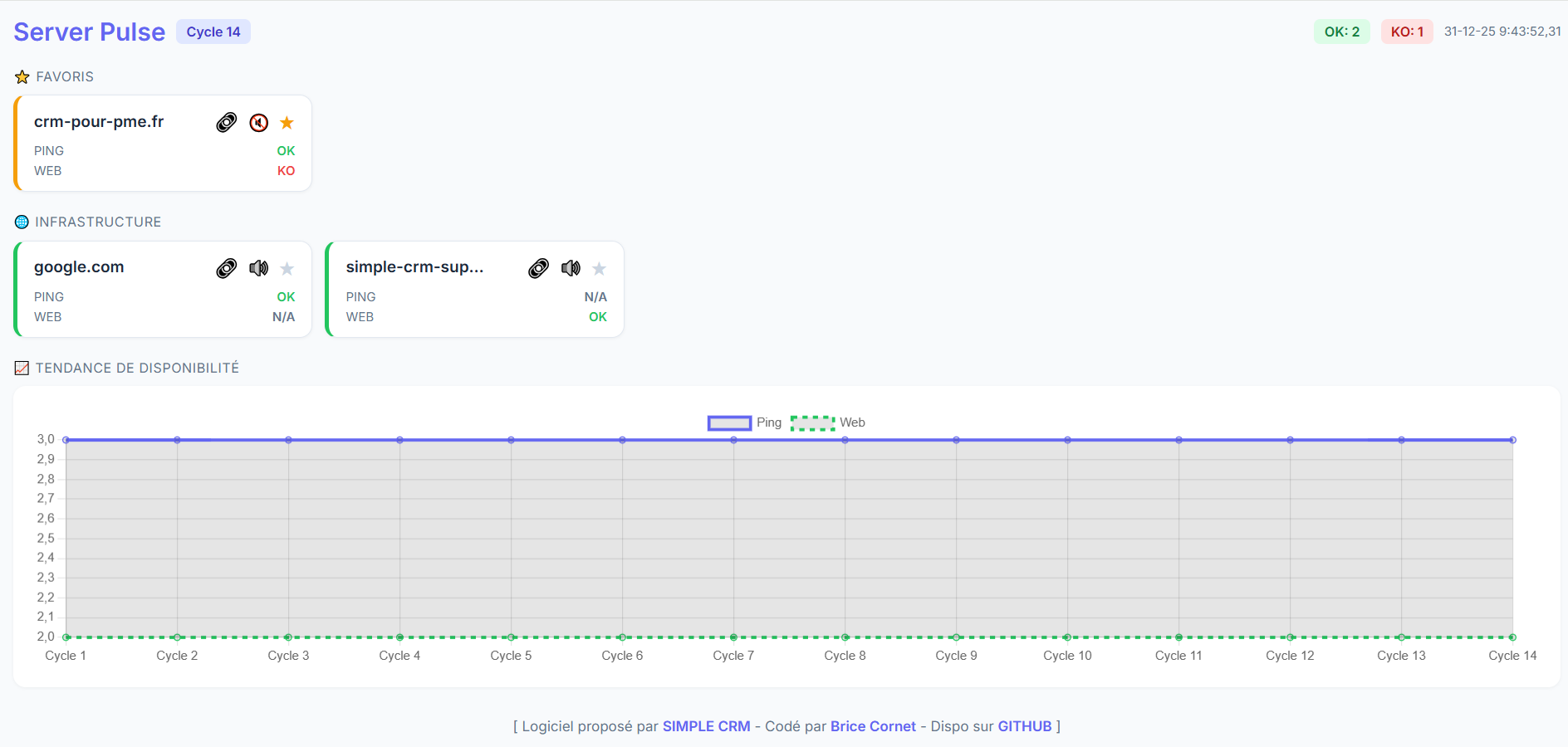
Ce système de monitoring local permet de surveiller la santé réseau et applicative de vos serveurs en toute confidentialité.
- CONFIGURATION DU FICHIER SITES.TXT
Le fichier 'sites.txt' accepte désormais jusqu'à 4 colonnes. Format : URL, MOT-CLEF, OPTION1, OPTION2
Scénarios de configuration :
- Ping + Web : google.com,Google
- Web uniquement (Serveur sous pare-feu ICMP) : ]monserveur.com,Bienvenue,noping
- Ping uniquement (Serveur non-web, ex: Active Directory) : 192.168.1.10,AD,noweb
- Invisible (Affiche N/A partout) : interne.local,Stats,noping,noweb
- COMPRENDRE LES INDICATEURS
- CYCLE : Nombre de scans effectués depuis l'ouverture du script.
- OK (Vert) : Le serveur est totalement opérationnel (ou opérationnel selon les options choisies).
- WARNING (Orange) : Le serveur répond au Ping, mais le service Web est en panne ou le mot-clef est introuvable.
- OFFLINE (Rouge) : Le serveur est totalement injoignable.
- N/A (Gris) : Le test a été volontairement désactivé pour ce serveur.
- FONCTIONNALITÉS DE L'INTERFACE
- FAVORIS (★) : Épingle les serveurs critiques en haut de page.
- MUTE (🔊) : Stop l'alerte sonore.
- LIEN DIRECT (🔗) : Ouvre l'URL du serveur dans un nouvel onglet.
- GRAPHIQUE DE TENDANCE : Affiche l'historique de disponibilité du parc. La légende permet de distinguer la santé Réseau (Ping) de la santé Applicative (Web).
- NOTES TECHNIQUES
- PERSISTANCE : Vos favoris sont stockés dans le 'Local Storage' de votre navigateur.
- HISTORIQUE : Le graphique se réinitialise si vous fermez et relancez le fichier 'monitor.bat'.
- SÉCURITÉ : Aucune donnée n'est transmise à l'extérieur de votre réseau. L'application fonctionne exclusivement via le fichier local 'data.js'.
Besoin d'un logiciel CRM pour votre entreprise ? Visitez : https://simple-crm.ai
Free server monitoring tool, running on Windows (PowerShell + web interface), ultra-lightweight and deployable in one minute.
============ SERVER PULSE - MONITORING DASHBOARD V1.5
This local monitoring system allows you to monitor the network and application health of your servers in total privacy.
- SITES.TXT FILE CONFIGURATION
The 'sites.txt' file now supports up to 4 columns. Format: URL, KEYWORD, OPTION1, OPTION2
Configuration scenarios:
- Ping + Web : google.com,Google
- Web only (Server behind ICMP firewall): monserveur.com,Bienvenue,noping
- Ping only (Non-web server, e.g., Active Directory): 192.168.1.10,AD,noweb
- Invisible (Displays N/A everywhere): interne.local,Stats,noping,noweb
- UNDERSTANDING THE INDICATORS
- CYCLE: Number of scans performed since the script was started.
- OK (Green): The server is fully operational (or operational based on the selected options).
- WARNING (Orange): The server responds to Ping, but the Web service is down or the keyword was not found.
- OFFLINE (Red): The server is completely unreachable.
- N/A (Grey): The test has been intentionally disabled for this server.
- INTERFACE FEATURES
- FAVORITES (★): Pins critical servers to the top of the page.
- MUTE (🔊) : Mutes the sound alert.
- DIRECT LINK (🔗): Opens the server URL in a new tab.
- TREND GRAPH: Displays the uptime history of your infrastructure. The legend distinguishes between Network health (Ping) and Application health (Web).
- TECHNICAL NOTES
- PERSISTENCE: Your favorites are stored in your browser's 'Local Storage'.
- HISTORY: The graph resets if you close and restart the 'monitor.bat' file.
- SECURITY: No data is transmitted outside your network. The application works exclusively via the local 'data.js' file.
============ Optimized for high-density monitoring.
Need a CRM software for your business? Visit: https://simple-crm.ai